Category: FooPlugins Guide

Creating a responsive image gallery on your WordPress blog
WordPress Gallery
Tam Vincent

How to Create a Responsive WordPress Gallery on your Blog

Using images is key to any blog, and one of the best ways to showcase your images is with a responsive WordPress gallery. We’re going to look at why you should be using images, why you need a responsive gallery, and we’ll explain how to install and set up your

Read More »
Use a Photo Gallery for your DIY blog
FooPlugins Guide
Tam Vincent

How to Use a Photo Gallery for your DIY WordPress Blog

Using a photo gallery on your DIY blog can give you an advantage. Whether you blog about a DIY project, craft or hobby, using good quality images can set you apart from the competition. Here are our reasons for using one. There are thousands of DIY blogs and websites available

Read More »
retina creation metabox in FooGallery plugin
Company Announcements
Adam W. Warner

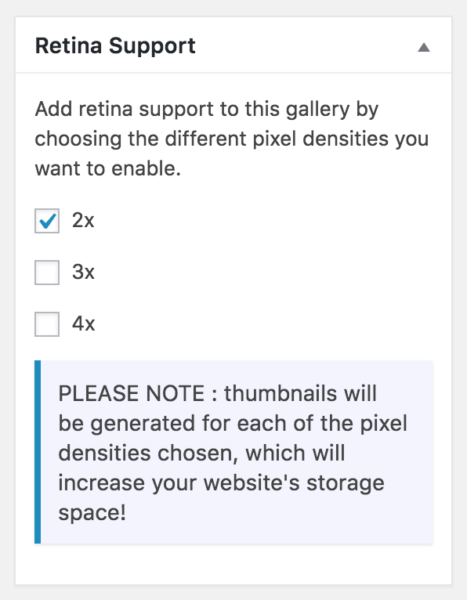
FooGallery – Now with Retina Creation and Display Support

FooGallery has just been updated to v1.2.18. It comes with two big features, one for end users and one for developers. Look for this version in your updates list or on the .org repo. This post will cover the new retina support. Look for the developer feature post coming in

Read More »
Rules for using images on your website
FooPlugins Guide
Adam W. Warner

4 Rules for Using Images on Your Website

If you have a food blog, a how-to website or if sell anything online, then you should be using images. In fact, anyone who wants their website to get noticed these days needs to use the right images. This might sound obvious, but not everyone gets it right. So here

Read More »
Astronomy course
FooPlugins Guide
Adam W. Warner

How to Create an Online Video Course in WordPress

If you search Google for “how to create a video course with WordPress” you’ll get a nice list of plugins designed for that very purpose. Most of them come packed with features specific to course management and running membership-type sites. But what if you don’t need all those features? What

Read More »
Staff Listing in WordPress
FooPlugins Guide
Adam W. Warner

Create a Staff Listing in WordPress

In this post, we’ll show you how to exactly how to create a staff listing or team directory using our free FooGallery plugin with WordPress.   Whether you’re building sites for clients or for your own business, giving visitors an option to see the people behind the business is important.

Read More »
FooGallery screenshot
Company Announcements
Adam W. Warner

Two Free WordPress Themes for Photobloggers (Video)

A few days ago Themeshaper announced the release of Boardwalk and Cubic, two beautiful new themes that display image-specific content in very unique ways. Because we’re always on the lookout to share tools that our Photography and Photoblogger uses can take advantage of, we decided to play with with a

Read More »
Gems of Docs
FooPlugins Guide
FooPlugins

Gems of Docs: Embed PDFs with FooBox Lightbox

Reliably embedding PDFs in a website is not as straight-forward as one might think. This is primarily because each browser handles PDFs differently. Some treat it only as a file, others as media, and Chrome even created its own unique PDF viewer. This means that users in every different browser

Read More »
Gems of Docs
FooPlugins Guide
FooPlugins

Gems of Docs: Custom Captions in FooBox

Today I’m starting a new series called “Gems of Docs”. I want to use this to highlight some features of our plugins that we’ve documented, but that seem overlooked. I also want to highlight great use-cases for how you can implement them on your site to excellent effect. Custom Captions

Read More »
Media Thumbnail Enlarger Before and After
FooPlugins Guide
Adam W. Warner

How to Enlarge Thumbnails in the Media Library

Our friend Nick Ciske has recently released the Media Thumbnail Enlarger plugin for free on the WordPress repository. What This Plugin Does This plugin increases the size of the media library thumbnails seen when viewing your WordPress Media Library page. By default, it uses the thumbnail size as determined in

Read More »
How to Troubleshoot a Plugin Conflict
FooPlugins Guide
FooPlugins

Plugin Troubleshooting

We’ve all been there: You’re excited about a new plugin, you download it, install it, and then BOOOM! Your site is a blank white page. Maybe you got the courtesy of an error message. Bottom line: A plugin broke your website and now it’s time to start troubleshooting. Why Does

Read More »