

Black Friday falls on Friday 27 November 2026, with Cyber Monday following on Monday 30 November. For most WooCommerce stores, that weekend will do more traffic than any other in the year.
Here’s the part that catches people out: the traffic is the easy bit. Discounts, ads and seasonal search intent will bring visitors to your store whether you plan carefully or not. What decides whether that weekend is a good one is your conversion rate: how many of those visitors actually buy something. And a conversion rate isn’t something you set up on the Thursday night. It’s the result of a series of decisions, each of which is easier and more effective the earlier you make it.
This post walks through those decisions in order. It’s a sequence, not a countdown, so it works whether you’ve got months to plan, or just weeks. Plus, each step includes a note on what to do if you’re short on time, because a compressed version of the right plan beats a thorough version of the wrong one.
Why so Many Black Friday Campaigns Underperform
Before we get into the action plan, it’s worth being clear about what usually goes wrong. In our experience poor results stem from four things, and none of them are about the size of the discount.
The campaign is built at the last minute. Throwing together a popup the night before means nobody has looked at it with fresh eyes. Copy goes out with the placeholder text still in it. The button contrast is wrong on mobile. The trigger fires on the wrong page. You get the idea. These aren’t strategic failures, they’re failures caused by rushing, and they’re entirely avoidable.
There’s no baseline. If you don’t know what your conversion rate looks like on a normal week, you can’t tell whether Black Friday went well. A store that converts at twice its usual rate and one that converts at half its usual rate can post identical revenue numbers on the weekend, and only one of them has a problem worth fixing.
Nothing was tested. Most stores run exactly one version of their Black Friday campaign. One headline, one offer presentation, one placement. It might be the best one, but there’s no way to know, and no way to find out after the fact, because the moment has passed and the traffic has gone.
Everything competes for attention at once. By the last week of November, every inbox, feed and homepage is shouting. A store that only shows up in that window is one voice among hundreds. A store that has been building interest beforehand arrives with an audience already paying attention.
The plan we’ve laid out below addresses each of these, roughly in the order they need addressing.
Step 1: Decide What You’re Actually Offering
Everything downstream depends on this, and it’s the step most often left vague until late. “We’ll do 25% off” is a decision. “We’ll do something for Black Friday” is not.
Get specific about four things:
- The mechanism. A flat percentage off, a free shipping threshold, a bundle, tiered discounts by spend, or early access for subscribers. These are not interchangeable — they behave differently and they need different campaign assets.
- The scope. Site-wide, specific collections, or excluding certain products. Margin-sensitive products usually need excluding, and it’s much easier to decide that now than to remedy it at the last minute or mid-campaign.
- The duration. A single day, the full weekend through to Cyber Monday, or a longer window. Longer windows reduce urgency but capture more of the browsing period.
- The floor. The point below which the promotion stops making commercial sense. It’s the thing that stops a mid-weekend panic decision from costing you money.

The mechanism matters more than people expect, because it determines what your campaign assets need to do. A free shipping threshold needs something that reacts to what’s in the cart. A flat discount needs a clear, repeated announcement and a way to catch people who are leaving. A bundle needs product-level targeting. Picking the mechanism first means you build the right thing once instead of the wrong thing twice.
Tip
Quick win
Short on time?
Choose the simplest mechanism you can execute well. A clean, clearly communicated flat discount will outperform an ambitious tiered structure that confuses people at checkout.
Step 2: Fix the Things that Kill Conversions
There’s a category of problem that never shows up as a marketing failure but reliably eats revenue: the store itself getting in the way. Black Friday traffic is impatient, heavily mobile, and mostly unfamiliar with your site. Anything that causes friction gets punished harder than usual.
Work through the unglamorous list:
- Page speed, particularly on product and cart pages. Slow pages lose people before they’ve seen your offer, and no popup can rescue a visitor who has already closed the tab.
- Mobile checkout, tested end to end on an actual phone rather than a narrow browser window. Complete a real purchase.
- Search and navigation. Visitors arriving from a deal roundup often don’t know your category structure. Can they find things?
- Stock and shipping information. Unclear delivery cut-off dates are one of the most common reasons a full cart gets abandoned.
- Anything you’ve been meaning to fix. Black Friday amplifies existing problems rather than creating new ones, so get these out of the way now.
This step is unrewarding and easy to skip. It’s also where the largest conversion gains usually hide, because it affects every single visitor rather than the subset who see your campaign.
Tip
Quick win
Short on time?
Test mobile checkout and confirm your shipping cut-off dates are visible. Those two cover most of the damage.
Step 3: Know Your Numbers from the Start
You need a baseline. In other words, what does a normal week look like for your store (recorded before seasonal traffic distorts everything)?
Capture your typical conversion rate, average order value, cart abandonment rate, and where your traffic comes from. This takes very little effort and it’s the difference between a post-Black-Friday review that produces insight and one that produces a shrug.
It also protects you from a specific trap. Seasonal traffic is less qualified than your usual traffic, with more browsers, more comparison shoppers, and more people who arrived from a discount page with no intention of buying. A conversion rate drop during Black Friday can therefore be completely normal, or it can be a broken checkout. Without a baseline, those look identical.
If your conversion tracking isn’t set up properly, this is the moment to sort it out. We’ve written separately about WordPress conversion tracking and the ways it commonly breaks, but the most relevant point for right now is that plugin and core updates can impact data collection, so validate your tracking after any update rather than assuming it still works.
Tip
Quick win
Short on time?
Screenshot your analytics dashboard for a normal week. It’s cruder than a proper baseline but infinitely better than nothing.
Step 4: Map Your CTA Moments
Most stores think about their Black Friday campaign as one thing: the popup. In practice a visitor passes through several distinct stages, and each one calls for a different kind of prompt or action.
Here are some of the stages worth planning for:
- Arrival. The visitor doesn’t yet know you have an offer. They need to find out immediately, without being blocked.
- Browsing. They’re looking at products. This is where urgency and social proof do their work.
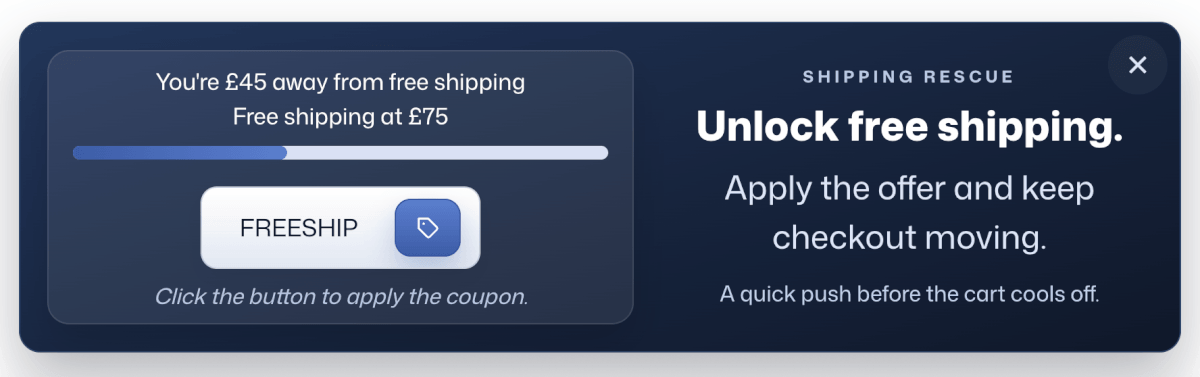
- Cart building. They’ve added something. This is the best moment to increase order value. For example, a free shipping offer earns more here than anywhere else on the site. Below is a look at FooConvert’s free shipping popup.
- Hesitation. They’re about to leave without buying. This is your last chance and a strategically place exit-intent popup converts better than most people expect.
- Checkout. They’ve started but not finished. A well-timed reassurance or coupon reminder recovers a meaningful share of these.
- Post-purchase. They’ve bought. This is the cheapest list growth and repeat-purchase opportunity you’ll get all year, and almost nobody uses it.
Write down what you want to say at each moment. You also don’t need all six; a small store might sensibly cover arrival, hesitation and cart building and stop there. But deciding this deliberately means your campaign covers the whole sales funnel rather than shouting the same message six times.
Tip
Quick win
Short on time?
Cover arrival and hesitation. A site-wide announcement plus an exit-intent catch is the highest-return pair.
Step 5: Build the Campaign
Now you build the assets that deliver those messages. This is the step people dread, and it’s the one that has changed most in the last couple of years.
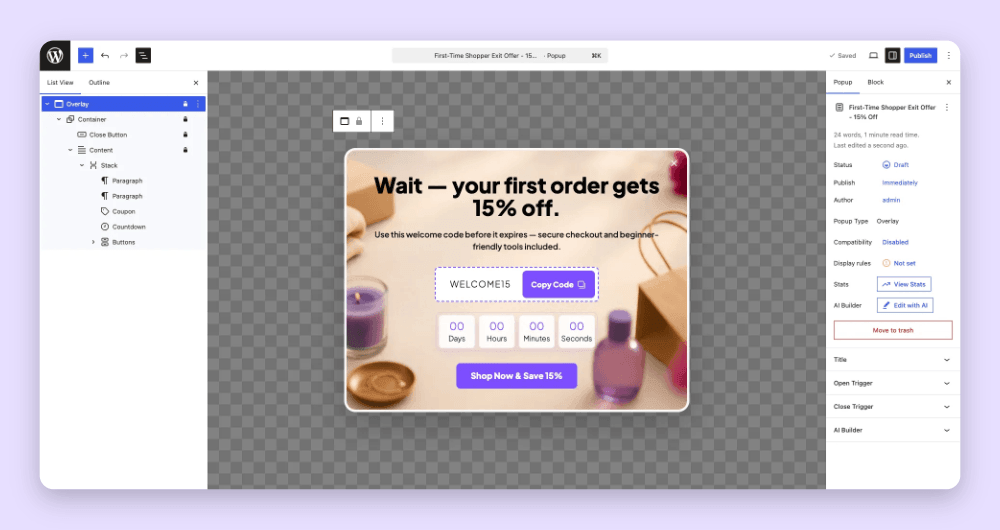
Historically, building a set of well-designed, correctly targeted popups meant either wrestling a page builder, paying a designer, or accepting whatever a template library gave you. That’s no longer the case. FooConvert is built around this specific problem: its AI Popup Builder extracts your brand context (i.e. your colours, typography and styling) and generates complete popups from a plain-language description, including copy, layout, triggers and display rules. You then refine them by describing what you want changed, and everything stays editable in the standard WordPress block editor, so you’re never locked out of the details. Here’s a popup built with this tool:
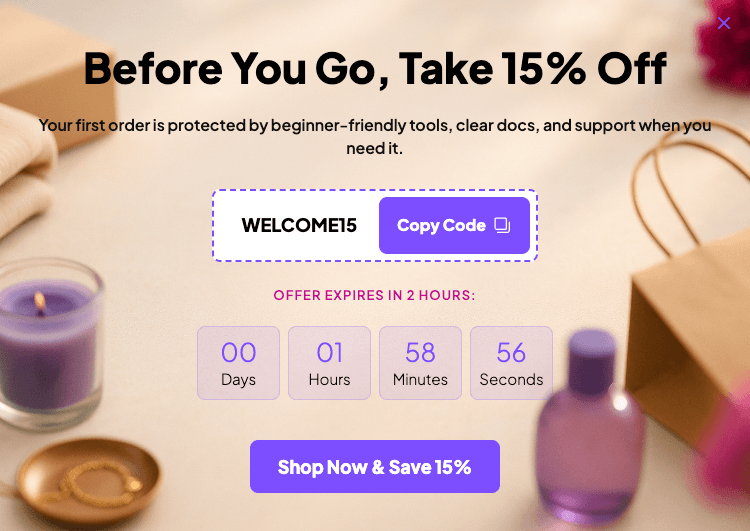
Practically, that means the build step stops being a multi-day project. You describe the Black Friday announcement bar you want, you get one that already looks like your store, and you adjust it. There are over 15 predesigned templates if you’d rather start from something concrete, and you can browse working examples to see the formats in action.
Whatever you build with, a few things are worth getting right at this stage:
- Match the format to the moment rather than using overlays for everything (more on this below).
- Use countdowns honestly. A countdown to a real deadline creates urgency. A countdown that resets when the page reloads creates distrust, and shoppers spot it.
- Check mobile properly. A popup that covers the whole screen on a phone with a close button that’s hard to hit will cost you more than it earns.
- Set your display rules deliberately. Not everyone should see everything. Existing customers, logged-in users and people who’ve already claimed the offer usually shouldn’t be shown the same prompt again.
Tip
Quick win
Short on time?
Build two assets well rather than six badly. Again, the announcement and the exit-intent are your best options.
Step 6: Test it While the Stakes are Low
This is the step that separates stores that improve year on year from stores that guess year on year, and it’s the one that genuinely rewards starting early.
The logic is simple. On Black Friday weekend itself, testing is nearly worthless; the weekend is over before you have enough data to act on, and any change you make mid-weekend risks breaking something at the worst possible moment. But on ordinary traffic, weeks beforehand, you can find out which headline, which offer framing and which placement actually works for your audience. Then you launch the winner.
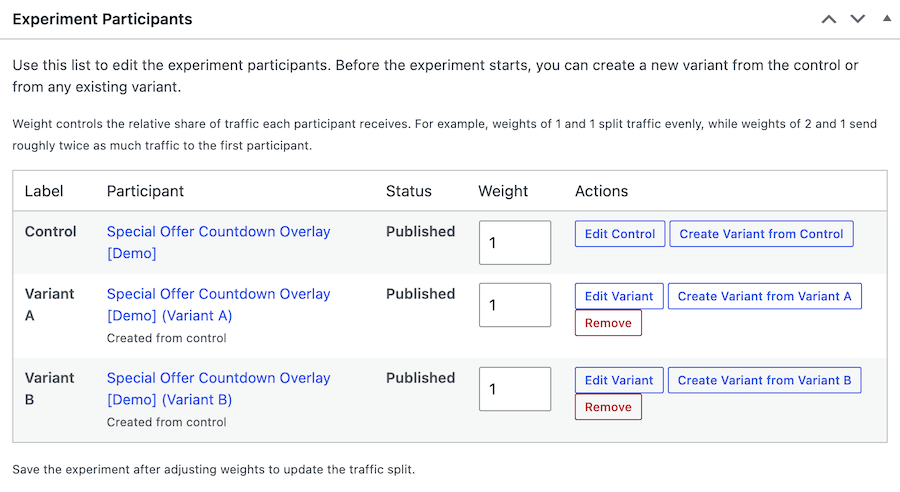
This is what A/B testing is for, and it’s often underused by smaller stores because it sounds like something that requires a data team. It doesn’t. In FooConvert’s A/B testing you create variants of the same popup, weight how traffic is split between them, choose what you’re optimizing for (i.e. conversions, clicks or leads) and let it run. Enable Auto-Winner and the winning variant is applied automatically once the result crosses your confidence threshold, so you’re not manually checking a dashboard.
What’s worth testing, in rough order of impact:
- The offer framing. “Save 20%” versus “20% off everything” versus “Save $40 on orders over $200” can perform very differently for the same underlying discount.
- The trigger timing. Exit-intent versus scroll depth versus time on page.
- The format. A bar and an overlay carrying the same message often produce quite different results.
- The call to action. Small, cheap to test, and sometimes giving you surprising results.
Run one test at a time and give each enough traffic to mean something, usually a week or two at a minimum.
Tip
Quick win
Short on time?
If you can only test one thing, test the offer framing on your main announcement. Even a short test on modest traffic tells you more than going into a campaign blind.
Step 7: Warm Up Your Audience
By the final week of November, anyone in ecommerce will be struggling to retain audience attention. The stores that do well are rarely the ones with the loudest offers; they’re the ones who had an audience already listening.
Warming up your audience means giving people a reason to be ready:
- Grow your list beforehand. Every subscriber you add before the season is someone you can reach on the day without paying for it. Lead capture popups do their most valuable work in the quiet weeks before your sale kicks in.
- Announce that something is coming before you announce what it is. A “Black Friday deals are coming” bar with a signup builds a segment of people who genuinely interested in seeing what you have to offer.
- Offer early access to subscribers. It rewards the list, it gives you a real reason to email, and it spreads your order volume across more than one afternoon.
- Have the launch email written already. The version you write calmly is better than the version you write on the morning.
FooConvert’s PRO tier includes lead capture integrations with Mailchimp and Brevo, so the addresses you collect go directly into the list you’ll be emailing rather than in a form submission table you have to export.
Tip
Quick win
Short on time?
Get a signup prompt live now, even a plain one. Every day it isn’t running is subscribers you’re losing out on.
Step 8: Launch the Sale, then Read the Data
Once the sale launches, you’ll need to restrain yourself. If you’ve tested the campaign, then trust the process and resist the urge to redesign it at noon on Friday because it “feels” slow.
Here’s what you can do instead:
- Check everything is live and working first thing on the Friday morning, such as triggers, display rules, coupon codes, and the checkout.
- Watch for breakage rather than performance. A discount code that isn’t applying is an emergency. A conversion rate that’s slightly below your hopes is not.
- Keep the Cyber Monday transition ready. If your offer changes or extends, that asset should already be built and scheduled, not improvised on the Sunday night.
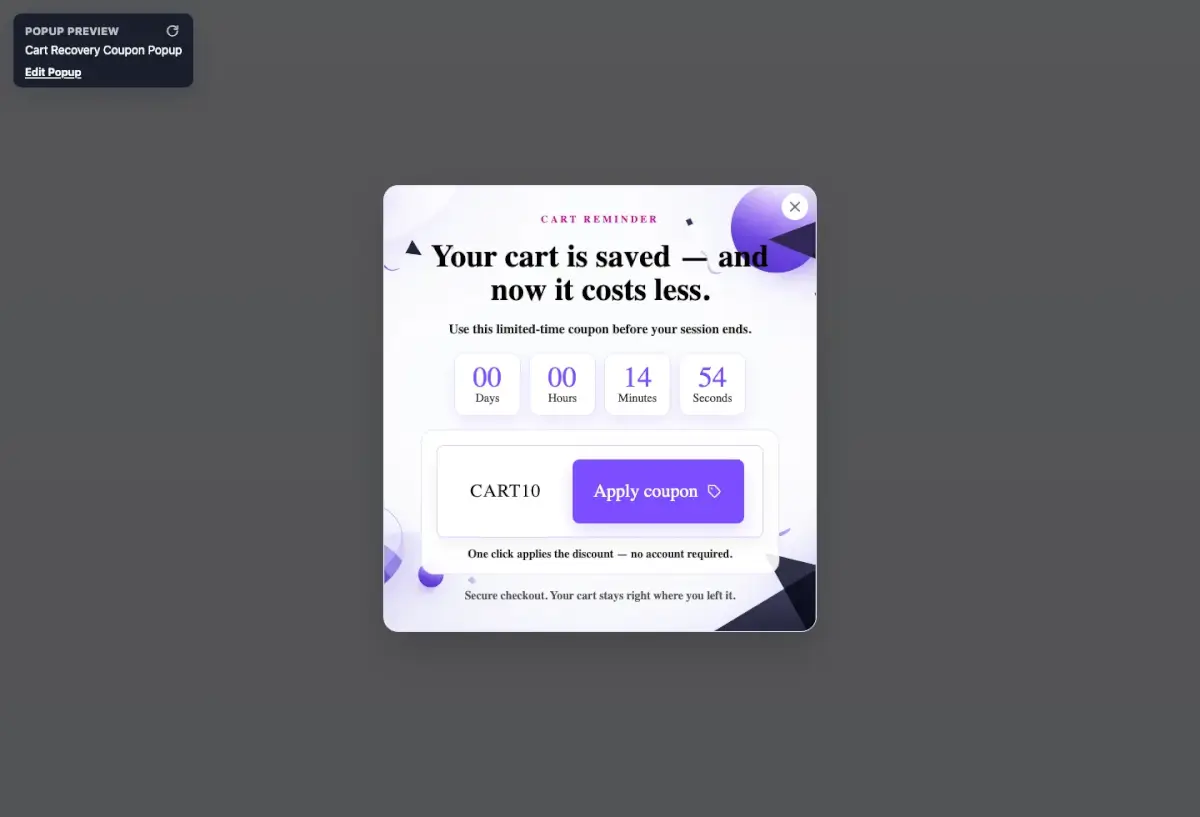
- Have a recovery prompt running. Cart and checkout abandonment will most likely peaks during high-traffic sales, so this is when recovery prompts earn the most.
Then, once it’s over, do the review while it’s fresh. Pull your popup analytics and compare against the baseline from step 3. Which prompts earned their place? Which moment in the funnel underperformed? Which variant won, and does that tell you something about your audience you didn’t know?
Write it down. Next year’s plan starts as this year’s review, and the stores that compound their conversion rate over time are the ones that bother with this step.
Choosing the Right Popup for Each Situation
A quick word on format, because using the wrong one is a common but easily fixed mistake.
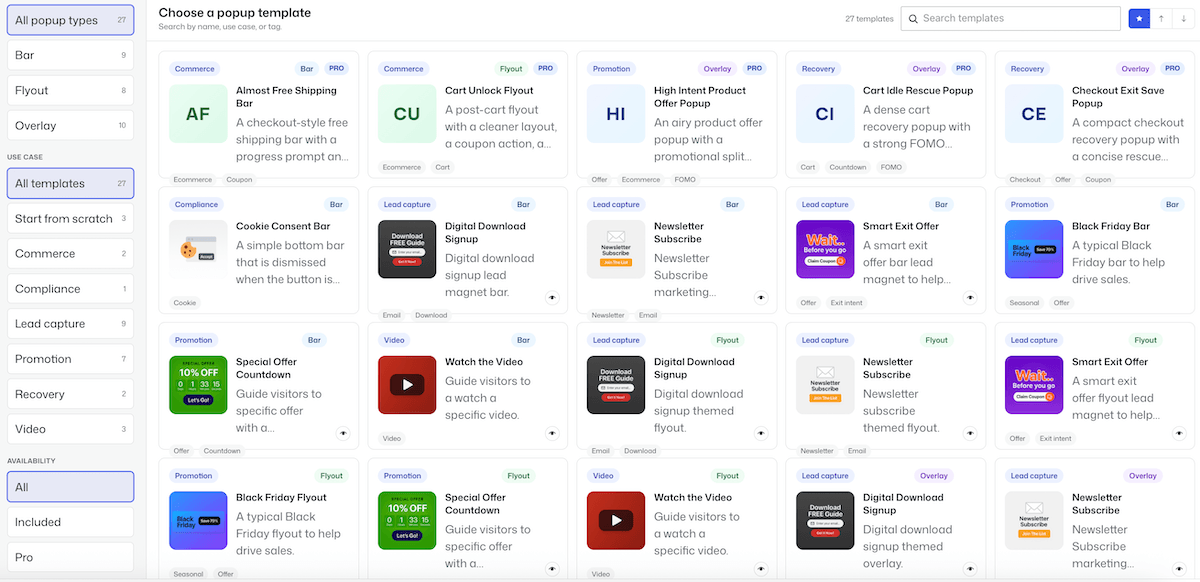
- Bars sit at the top or bottom of the page and don’t block anything. They’re the right choice for first-time or arriving visitors: a site-wide Black Friday announcement, a shipping cut-off notice, or a free shipping threshold that stays visible while someone shops. They’re also the safest format to run for the whole campaign as they’re persistent but non-intrusive,
- Flyouts slide in from the edge. They’re more noticeable than a bar and less confrontational than an overlay, which makes them well suited to the browsing moment, such as a cross-sell, a related-product nudge, social proof, or a secondary offer that deserves attention but not the whole screen.
- Overlays are the traditional modal popup, and they command attention by interrupting. That makes them powerful and easy to overuse. Reserve them for situations that justify an interruption: exit-intent, a genuinely significant announcement, or a high-value lead capture. One well-placed overlay converts better than three that annoy people.
The general rule is to escalate: bar for constant presence, flyout for a nudge, overlay for the moments that matter most. If you’d like a broader look at how different tools handle these formats, we’ve compared the main WordPress conversion plugins separately. FooConvert gives you a variety of templates for each format, and includes WooCommerce-integrated options.
WooCommerce-Specific Popups
If you’re running WooCommerce, there’s a set of strategies available to you that generic popup tools can’t match, because they depend on knowing what’s happening in the cart and at checkout. These tend to be the highest-value plays of the whole campaign, and they’re worth planning deliberately rather than treating as extras.
- The free shipping progress prompt. A cart-aware bar showing how much more a customer needs to spend to unlock free shipping is the most reliable average-order-value lever available to most stores, and it works because it gives the shopper a concrete, achievable goal at exactly the moment they’re deciding whether to add one more thing.
- Cart-triggered offers. A product being removed from a cart is a strong signal of hesitation, and it’s a moment almost nobody responds to. Prompts that fire when the cart is updated, or when a product is removed can address this issue.
- Checkout rescue. This is a prompt at the point of checkout abandonment, reminding the customer of the code or reassuring them about delivery. Abandonment rates climb during high-traffic sales, so the same prompt is worth more in November than in March.
- One-click coupon application. Making the customer copy a code, navigate to the cart and paste it introduces friction at the worst possible point. A prompt that applies the code directly removes it.
- High product intent targeting. Showing a different message to someone who has viewed a product several times than to someone who just landed on the homepage means you’re targeting the most likely prospects for a sale.
These are some of the features included in FooConvert’s PRO tier; its WooCommerce triggers cover cart, checkout and product-intent events, and there’s the Apply Coupon and Free Shipping Progress blocks. These are also the strategies with the clearest return, so if you’re deciding what to invest in for a WooCommerce Black Friday sale, this is the part that pays for itself.
FooConvert WordPress conversion plugin
The Best WordPress Conversion Plugin
FooConvert is an easy-to-use WordPress conversions plugin, draw attention, increase sales and engagement.
FooConvert is owned and maintained by FooPlugins. When we mention or recommend FooConvert in this article, that relationship may influence how the product is covered; product details should be checked against current documentation, demos, pricing, and release notes.
What to Measure (and Why Your Baseline Matters)
Just looking at the numbers isn’t likely to get you anywhere. Rather, decide in advance which figures will actually impact how you run your sales.
For each individual prompt, you want to know its click-through rate, its conversion rate and, if your tool supports it, the revenue attributed to it. Views alone tell you nothing useful; a popup that’s seen by everyone and acted on by nobody is a liability, not an asset. FooConvert PRO’s analytics shows you conversion rates, engagement ratios, daily activity and sales value per popup, which is what lets you distinguish the prompt that’s carrying the campaign from the one that’s just adding noise.
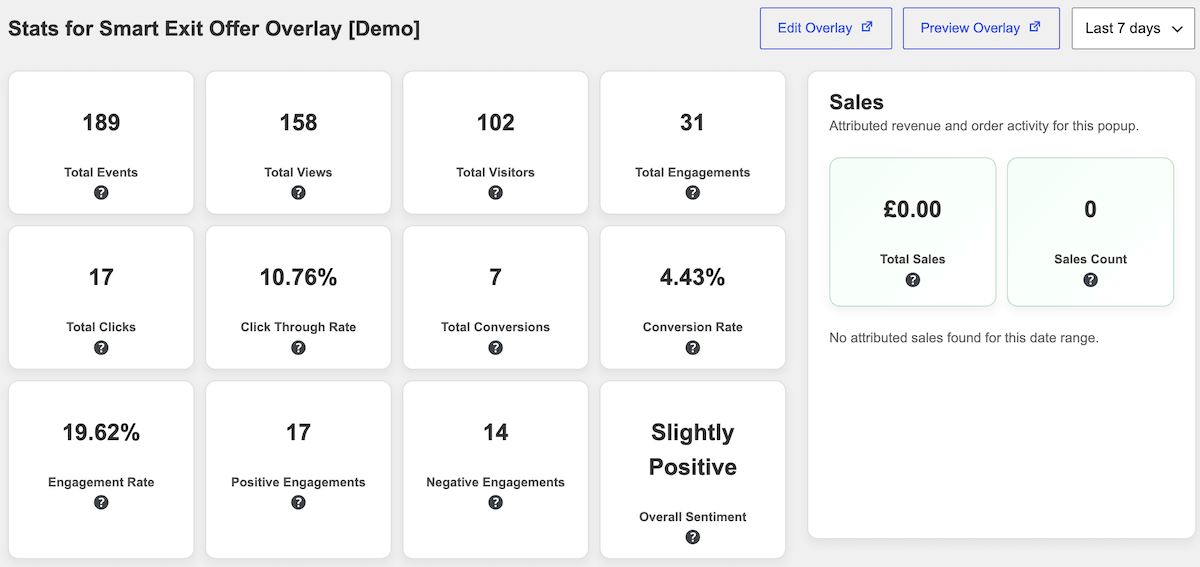
For the campaign overall, the numbers that matter are your conversion rate, your average order value, and your cart abandonment rate, all compared against your baseline. This is why step 3 (knowing your numbers from the start) matters more than you’d think: raw Black Friday figures are close to meaningless in isolation, because the traffic mix is so different from normal. The comparison is the whole point.
One more thing worth tracking that most stores don’t: how many subscribers you added during the campaign. Black Friday traffic is the cheapest list growth of the year, and those addresses add value to every campaign you run afterwards.
The Black Friday Checklist
Getting ready for Black Friday? Here’s your play-by-play checklist of what you need to do:
- Decide on your offer: mechanism, scope, duration, and the maximum you can offer.
- Check page speed, particularly for product and cart pages.
- Complete a mobile checkout end-to-end on a real phone.
- Make shipping cut-off dates visible on the site.
- Record your baseline recorded: conversion rate, AOV, abandonment rate, etc.
- Validate conversion tracking after any recent updates.
- Map our funnel moments and decide on a message for each one.
- Build campaign assets for Black Friday, check they work on mobile, and set display rules.
- Run at least one A/B test with real traffic.
- Set up a prompt for list growth (e.g. lead capture or sign-up).
- Plan an early-access or teaser campaign for subscribers.
- Write your launch email in advance.
- Build and schedule Cyber Monday transition assets (if applicable).
- Put recovery prompts live for cart and checkout abandonment.
- Post-campaign, review the data and make notes for the following year.
Get Started with Black Friday Conversions Now
The honest summary is that every step in this plan is easier and more effective the sooner you take it. But none of them become useless if you’re starting late. If Black Friday is a fortnight away, you can still decide your offer properly, fix your mobile checkout, record a rough baseline, build two good prompts and run a short test. That’s a substantially better campaign than most stores will launch.
What you can’t do late is find out what works. Testing needs traffic and traffic needs time, which is the one part of this plan that genuinely rewards starting now rather than later.
If the popup-and-test portion is the part you’d rather not build from scratch, that’s where FooConvert comes in. The AI Popup Builder handles the building, A/B testing handles the finding out, and the analytics tell you what to keep. You can start with the free version or compare Free and PRO to see which option gives you the features you need.
Black Friday is 27 November. Deciding on the offer is the first step, then get FooConvert set up to drive your conversions.
FooConvert WordPress conversion plugin
The Best WordPress Conversion Plugin
FooConvert is an easy-to-use WordPress conversions plugin, draw attention, increase sales and engagement.