
FooGallery Social Add-on for Likes, Comments, and Sharing
Turn a standard image gallery into a social experience with lightbox comments, visible likes, and social sharing powered by FooGallery Social.
FooGallery add-on
Compatible free & pro
30-day guarantee
Feature Overview
Core Engagement Features For Your Galleries
Enable only the social features that fit the gallery: likes, comments, sharing, or all three together.
Likes
Capture instant feedback.
Show a heart icon, collect likes from public or logged-in visitors, and display totals where they help.
Comments
Start image-specific discussion.
Add comments to the lightbox and manage moderation through the WordPress comment system.
Sharing
Make individual images easier to share.
Display social icons in the built-in lightbox and choose the networks, size, placement, and share target.
Why use this Add-on?
When Engagement Matters.
FooGallery Social is for image galleries where visitor feedback, discussion, and sharing matters.
Publishers
Visitors like their favourites.
Likes give visitors a low-friction way to react, images can be sorted by likes.
Communities
Image Comments with No Code.
The add-on adds comments inside the FooGallery lightbox while still relying on WordPress comment controls.
Marketing
Let visitors share your images.
Easily add social sharing to galleries, and let your visitors market your content for you.
Features
FooGallery Social Features

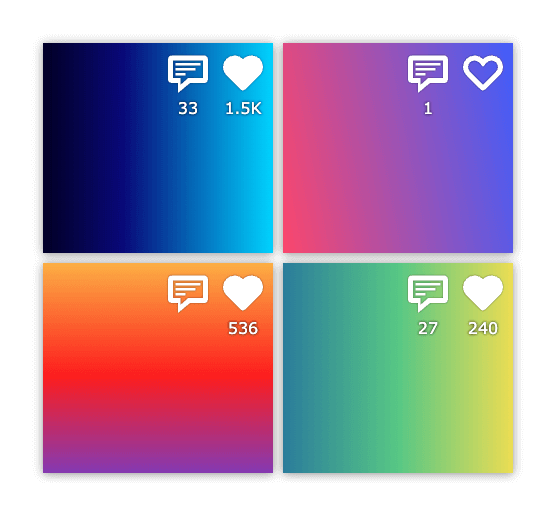
Show visible preference signals.
Visitors can like gallery images, while site owners decide whether likes are public or limited to logged-in users.
- Show like totals on thumbnails and in the lightbox.
- Allow public likes or require a logged-in user.
- Use built-in spam and abuse protections for repeated likes.
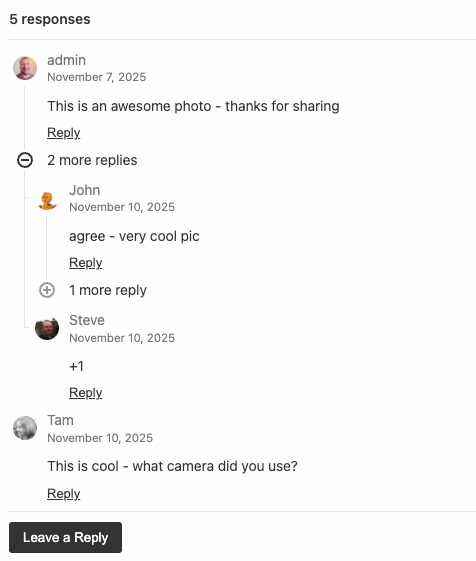
Use WordPress moderation where it already works.
FooGallery Social places comments in the gallery lightbox and keeps moderation, avatar, login, consent, and nesting behavior tied to WordPress Discussion settings.
- Display comments beside the selected gallery item.
- Use existing WordPress comment approval and moderation workflows.
- Choose comment placement, default open state, nested display, and mobile behavior.

Send visitors to the right share destination.
Sharing supports networks and utility actions from the FooGallery lightbox, with control over what URL is shared.
- Enable networks including Facebook, X/Twitter, LinkedIn, Pinterest, Reddit, Tumblr, Email, and Download.
- Choose icon position and size for the built-in FooGallery lightbox.
- Share the gallery page, attachment page, direct attachment URL, or linked WooCommerce product.
Pricing
FooGallery Social Add-on Pricing
The Social add-on is sold annually by site count and includes the current 7-day free trial and 30-day money-back guarantee terms from the product profile.
Most Popular
FooGallery Social – 5 Sites
Social gallery features for a small portfolio of sites.
Get instant feedback with likes
Comments promote interaction and conversation
Lightbox social sharing
Comment moderation
Sort gallery images by likes
$89.99
$
89
.99
/ year
Most popular license.
Lifetime is a one-time payment for the selected plan and site allowance.
7-day free trial + 30-day money-back guarantee
Compatibility
Social Add-on works with
FooGallery Free or PRO
The Social add-on supplies likes, comments, and sharing to any FooGallery gallery.
Supported
FooGallery Free + Social add-on
Use likes, comments, and sharing on standard FooGallery image galleries.
Supported
PRO Starter + Social add-on
Use the add-on alongside Starter galleries and layouts.
Supported
PRO Expert + Social add-on
Use the add-on with Expert features, including video galleries when video support is needed.
Supported
PRO Commerce + Social add-on
Use the add-on with Commerce product galleries and share linked WooCommerce products.
FAQ
Frequently Asked Questions
No. FooGallery Social works with FooGallery Free or any PRO plan when the Social add-on is installed and licensed. PRO is only needed for separate PRO-only gallery features, such as video support in PRO Expert or WooCommerce product galleries in PRO Commerce.
Yes. FooGallery Social adds image likes and lightbox comments so visitors can react to individual gallery items. Comments use WordPress comment settings for moderation, login requirements, nesting, avatars, and consent.
The current Social settings support sharing options such as Facebook, X/Twitter, LinkedIn, Pinterest, Reddit, Tumblr, Email, and Download. Site owners choose which social networks appear, plus their icon size and lightbox position.
The share target is configurable. FooGallery Social can share the gallery page, the image attachment page, the direct attachment URL, or a linked WooCommerce product when the gallery item is tied to a product.
Yes, Social can work with video gallery items, but embedding videos in FooGallery requires the separate video support included with FooGallery PRO Expert.
Yes, the FooGallery Social Add-on was built to work with FooGallery Free!
There are annual licenses for 1, 5 and 25 sites. Check out the pricing section above for more details.
Yes, comment moderation uses the built-in WordPress moderation path, so you can approve comments before they go live. You can also choose which images allow comments. If you use a spam detection plugin, that will also work on these comments.
Turn Galleries Into Social Experiences
Add likes, comments and easy sharing to FooGallery images and galleries