
Scheduling FooBar

You can schedule your notification bars with FooBar Pro. This feature allows you to set a start date and time, as well as an end date and time.

Below we show you how to set this up.

You will find the scheduling settings under the Visibility tab. To make use of this features, navigate to this tab and select Enabled.
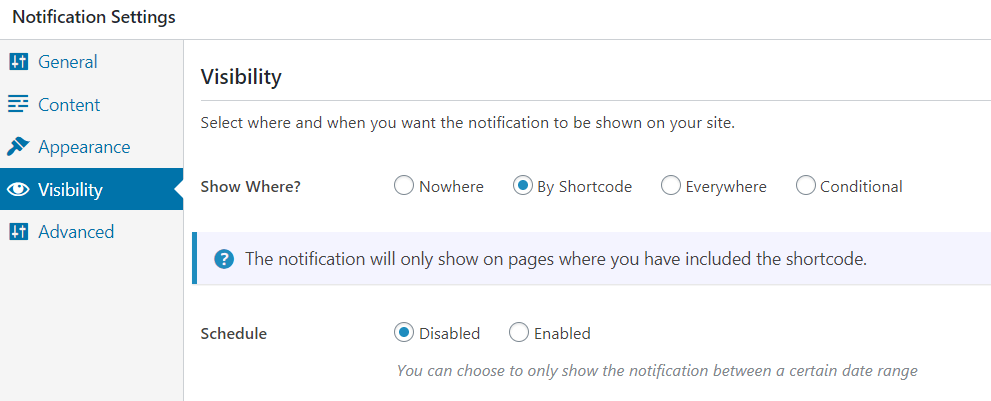
enable scheduling with foobar pro

Once enabled, you will see two new fields. Here you can use the From Date to set when the bar will start displaying. Then set the To Date for when you want the bar to stop showing.
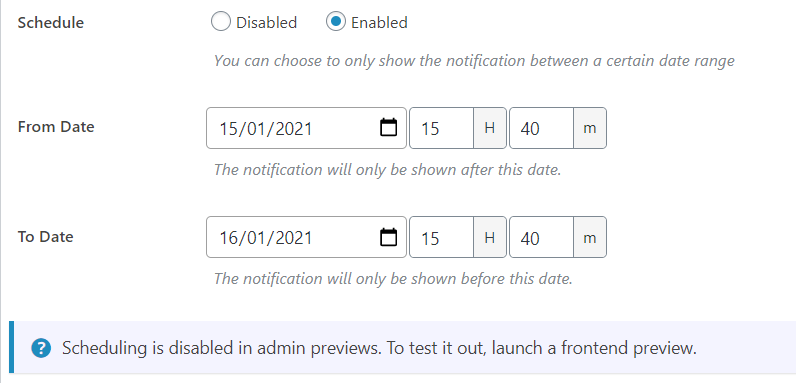
Scheduling settings for foobar pro notification bars

Resources

Find the right next step

Use this grid for documentation indexes, support routes, account links, affiliate resources, and download pages.

Documentation

Search setup guides, product docs, and troubleshooting articles.

Support

Open a ticket with product details so we can help quickly.

Licensing

Review account, renewal, refund, and license information.

Pricing update

Monthly & Lifetime plans are currently not unavailable

We’re not offering these payment options right now. Leave your name and email and we’ll let you know as soon as they return.

NameEmailNotify Me

No spam - Unsubscribe anytime