Tag: wordpress

Gallery Filtering with FooGallery Pro
Company Announcements
Tam Vincent

Gallery Filtering Now Available in FooGallery Pro

FooGallery Pro‘s latest update includes Gallery Filtering. You can now add media tags or categories to images in your WordPress Gallery, allowing you to filter the images by those tags or categories. This has been one of the most requested features since we released FooGallery PRO and it is immediately

Read More »
Foobox responsive lightbox plugin
WordPress Lightbox
Tam Vincent

FooBox: The WordPress Lightbox Plugin You Should Be Using

FooBox from FooPlugins is a mobile-ready responsive lightbox plugin that can be used on your WordPress site. FooBox gives you the capability to add beautiful images to your site, either as part of a gallery or as a stand-alone lightbox. Here’s why you should be using this handy tool on your

Read More »
Why you need to use a WordPress Gallery Plugin
Practical Tips
Tam Vincent

Why You Need to Use a WordPress Gallery Plugin

WordPress comes standard with its own media and gallery options, but it’s a good idea to use a WordPress Gallery Plugin nonetheless. The WordPress Gallery option When loading posts or pages to your site, WordPress gives you the option to add media. You can add images, giving each a caption,

Read More »
FooGallery is the Best NextGen Alternative
FooPlugins Guide
Tam Vincent

FooGallery is the best NextGen Alternative

The NextGen gallery plugin recently had some trouble with PHP 7 compatibility, and we had a lot of people asking how they can migrate hundreds of galleries that they had created using NextGen, into a good alternative, like FooGallery. It turns out this is really simple and effortless to do,

Read More »
Free Online Design Tools
Practical Tips
Tam Vincent

19+ Free Online Design Tools for your WordPress Blog

Online graphic design tools can be used to add something extra to your images, blogs and WordPress site. There are a number of tools freely available, or some with free versions. And the great thing is, you don’t need to be a graphic designer to use them. From designing blog

Read More »
Creating a responsive image gallery on your WordPress blog
WordPress Gallery
Tam Vincent

How to Create a Responsive WordPress Gallery on your Blog

Using images is key to any blog, and one of the best ways to showcase your images is with a responsive WordPress gallery. We’re going to look at why you should be using images, why you need a responsive gallery, and we’ll explain how to install and set up your

Read More »
retina creation metabox in FooGallery plugin
Company Announcements
Adam W. Warner

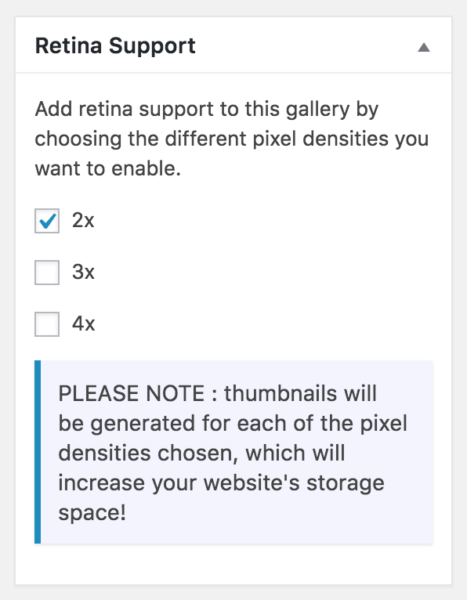
FooGallery – Now with Retina Creation and Display Support

FooGallery has just been updated to v1.2.18. It comes with two big features, one for end users and one for developers. Look for this version in your updates list or on the .org repo. This post will cover the new retina support. Look for the developer feature post coming in

Read More »
Rules for using images on your website
FooPlugins Guide
Adam W. Warner

4 Rules for Using Images on Your Website

If you have a food blog, a how-to website or if sell anything online, then you should be using images. In fact, anyone who wants their website to get noticed these days needs to use the right images. This might sound obvious, but not everyone gets it right. So here

Read More »
Astronomy course
FooPlugins Guide
Adam W. Warner

How to Create an Online Video Course in WordPress

If you search Google for “how to create a video course with WordPress” you’ll get a nice list of plugins designed for that very purpose. Most of them come packed with features specific to course management and running membership-type sites. But what if you don’t need all those features? What

Read More »
Media Thumbnail Enlarger Before and After
FooPlugins Guide
Adam W. Warner

How to Enlarge Thumbnails in the Media Library

Our friend Nick Ciske has recently released the Media Thumbnail Enlarger plugin for free on the WordPress repository. What This Plugin Does This plugin increases the size of the media library thumbnails seen when viewing your WordPress Media Library page. By default, it uses the thumbnail size as determined in

Read More »
WordPress Pinback DDoS Prevention Plugin
WordPress Guide
Brad Vincent

Beware : Your Site Is Part of a WordPress Pingback DDoS Botnet

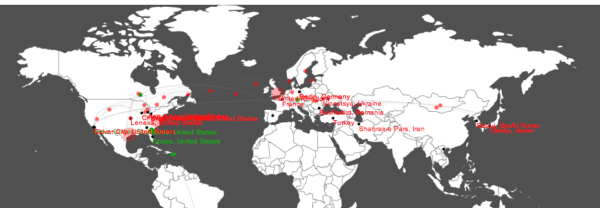
18 Mar 2014 Update : the plugin has been accepted and is now available on the WordPress.org plugin repo! Recently, Sucuri posted about 160,000 WordPress sites being used in a DDoS attack. This got me worried about my personal blog, as someone had emailed me last year, claiming that my

Read More »