

If you’re a photographer looking to build a WordPress site, chances are you’re not starting from scratch. You’ve got great images, you’ve got clients, and you need a site that actually brings in bookings rather than just sitting there looking pretty.
The good news: a well-configured WordPress photography website isn’t complicated to set up. The less good news: there are a few decisions that really matter, and making the wrong call on hosting, gallery plugins, or site structure can quietly cost you clients without you ever knowing why.
This guide covers all of it: hosting, portfolio setup, client photo delivery, local SEO, and how to make sure visitors actually get in touch. Let’s get into it.
What Your Photography Website Actually Needs to Book Clients
Before diving into plugins and settings, it’s worth being clear about what a photography website needs to do. Displaying beautiful images is a given, but what separates sites that generate consistent enquiries from those that don’t comes down to five things:
- A fast, mobile-responsive portfolio gallery. Most people will find your work on their phone. If your gallery loads slowly or feels clunky to navigate on mobile, you’ve lost them before they’ve even seen your best shots. Page speed is also a direct Google ranking factor, so a sluggish gallery hurts your visibility too.
- A client gallery system for delivering finished work. Sharing photos via Google Drive or WeTransfer works, but it doesn’t feel like a premium experience. A branded, password-protected gallery delivered from your own domain makes for a more professional service.
- A clear, frictionless contact and booking pathway. The fewer clicks between “interested” and “enquired,” the better. Buried contact forms and booking systems that require account creation are silent conversion killers.
- Enough pricing information to qualify leads. You don’t need to publish a full rate card, but visitors should be able to work out within seconds whether they can afford you. Without this, you might get more enquiries, but fewer good-quality ones.
- An About page that builds trust. People hire photographers they feel good about, especially for important events. A well-written About page does more conversion work than an additional portfolio gallery.
WordPress Hosting for Image-Heavy Sites
Hosting is where most photography websites run into trouble — and where the cheapest option reliably turns out to be the most expensive one in the long run.
A plan that works fine for a text-based business site will often struggle under the demands of a portfolio serving high-resolution images to real visitors. Here’s what to look for:
- SSD storage as standard. Traditional hard drives introduce latency when retrieving images, which translates directly into slower gallery load times. Any hosting plan worth considering for a photography site should include SSD storage by default, not as a paid upgrade.
- CDN support. A Content Delivery Network (CDN) serves your images from servers close to each visitor’s location. Without one, someone in the UK loading a gallery on a US-hosted site will notice. Most managed WordPress hosts include CDN integration or work directly with Cloudflare.
- Enough storage for where you’ll be in two years, not just today. A single full-day wedding shoot typically yields 500–800 edited images. At an average exported JPEG size of 3–5MB, that’s 1.5–4GB per gallery. If you’re shooting 20–30 weddings a year, you’ll want at least 30–120GB of gallery storage; and that’s before accounting for your portfolio, blog, and backups. Plan for growth from the start.
- Bandwidth headroom for busy seasons. Photography is often seasonal. A hosting plan with tight bandwidth limits can throttle your site or trigger overage charges precisely when you’re getting the most traffic, and the most potential bookings.
- Automatic backups. Your portfolio represents years of work. Daily automated backups to offsite storage aren’t optional; they’re the difference between a minor inconvenience and a catastrophic loss.
Managed WordPress hosting is worth considering for photography sites specifically. These plans come pre-configured for WordPress performance and typically include one-click staging environments — useful when you want to test changes without breaking the live site your clients are visiting.
Setting Up Your Portfolio Gallery with FooGallery
Your gallery plugin is the most consequential technical choice on a photography website. It shapes how images are displayed, how quickly they load, and how visitors experience your portfolio on every device.
FooGallery was built specifically for WordPress and is optimised for Core Web Vitals (the performance metrics Google uses as ranking signals). The plugin has been rewritten to improve Largest Contentful Paint, First Input Delay, and Cumulative Layout Shift scores, which matter a lot for image-heavy pages.
Choosing the Right Layout
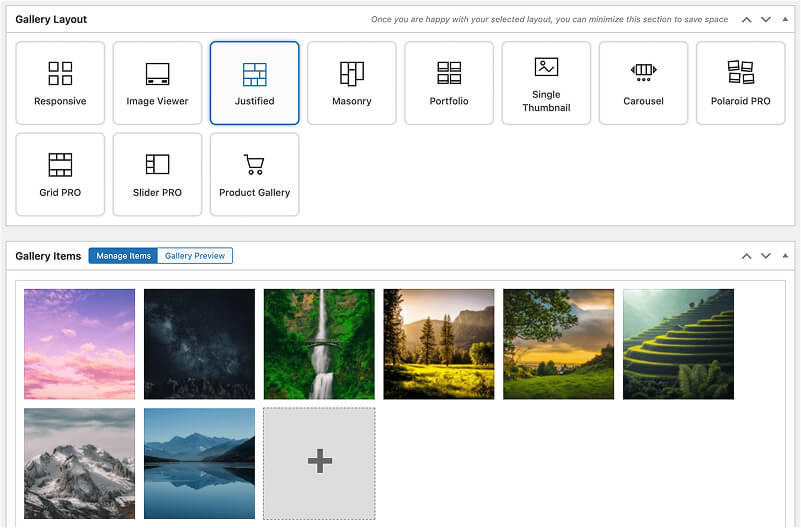
FooGallery offers over 10 layout options, depending on your plan. Choosing the right one comes down to your style and how your images are proportioned.
Masonry is the go-to for photographers who shoot in both portrait and landscape orientations. It accommodates varying dimensions without cropping or awkward white space, and the flowing, editorial feel works particularly well for wedding, lifestyle, and portrait photographers.

Justified creates clean horizontal rows where every image aligns to a consistent height, regardless of its original proportions. The result feels polished and intentional — great if your work spans multiple categories and you want a unified look across all of them.
Grid (on the PRO Starter plan) uses uniform thumbnails in structured rows and columns. Product photographers, architecture photographers, and anyone who shoots consistently in one aspect ratio often prefer this for its crisp, ordered presentation.
Spotlight, Polaroid, and Slider layouts are also available on PRO Starter and above, and are good options if you want something more distinctive on your homepage or featured landing pages.
Lightbox Viewing
FooGallery comes with a built-in customizable lightbox that lets visitors view full-size images in an overlay without leaving the gallery page. This keeps them engaged with your portfolio and makes it much more likely they’ll see the full range of your work. Alternatively, it also integrates with FooBox, FooPlugins’ dedicated WordPress lightbox plugin.

Performance Out of the Box
FooGallery’s built-in lazy loading means images load as visitors scroll rather than all at once. This results in a meaningful improvement for initial page load times, especially on mobile. Lazy loading is included in the free version and is enabled by default.
Retina image support ensures your galleries look sharp on high-resolution screens without serving oversized files to everyone else.
Really great plugin. The only one that can accomplish the complex level of detail and deliver it quickly.
Brandon
Organising Your Portfolio
One of the most common (and easily fixed) problems in photography portfolio setup is galleries organised by shoot date instead of service type. A prospective wedding client doesn’t want to scroll past newborn sessions and product shoots to find relevant work.
Organise galleries by what clients are actually looking for — ceremonies, portraits, engagements, commercial — and put the gallery most relevant to your target client first.
FooGallery’s tag-based filtering lets visitors filter within a single gallery by category, season, location, or style. This is actually preferable to creating separate gallery pages from an SEO perspective: one filterable gallery keeps all your search authority on a single URL rather than spreading it thin across many.
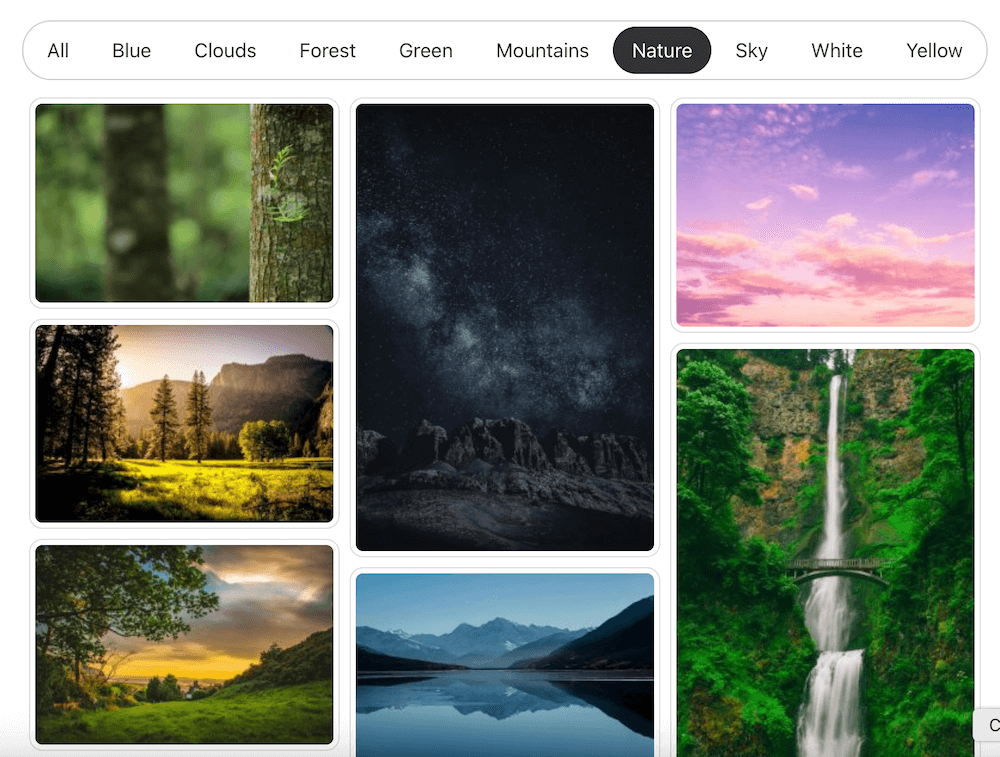
A note on gallery count: the first two galleries on a photography portfolio get the vast majority of visitor engagement. If your strongest work isn’t in gallery one or two, most visitors won’t see it. Treat gallery order as a conversion decision, not just a design one. Five to seven well-curated galleries is the sweet spot; more than that, and the impact of each one starts to dilute.
Delivering Finished Photos: Client Gallery Management
How you deliver photos to clients says a lot about how you run your business. Swapping out consumer file-sharing tools for a branded gallery on your own domain is one of the simplest ways to signal that you take the client experience seriously.
Password-Protected Client Galleries
FooGallery supports password-protected galleries, so you can create a private, polished delivery page for each client’s finished work without needing a separate plugin. This is available on the free FooGallery plan, but could be paired with the FooGallery Social add-on, for extra capabilities such as likes, commenting, and sharing (including downloads).
Here are a few suggestions to get this set up well:
- Include the gallery URL, password, and simple navigation instructions in your delivery email. Don’t assume clients will figure it out.
- Set a clear archiving policy and communicate it at booking. Wedding galleries might stay active for 12 months; portrait sessions could be archived after six. Clients appreciate knowing this upfront.
- Keep client names out of public-facing gallery tags or metadata, particularly for private events.
Added Image Protection
Watermarking is available on the PRO Commerce plan. It lets you protect preview images while still giving clients a great browsing experience. They can view and share their favourites, but high-resolution, watermark-free files are only available through a separate download or purchase.

Right-click image protection (also PRO Commerce) adds a basic deterrent against casual copying without making the gallery feel locked down for legitimate clients.
FooGallery WordPress gallery plugin
Protect client images without friction
Ready to set up your first client gallery? FooGallery is the ideal solution…
Digital Downloads with WooCommerce
If you’re not already digital prints, it’s worth considering. According to the Professional Photographers of America, photographers who sell print products in-house typically achieve product margins of 40–60% (with fulfilment handled by third-party print partners, so you’re not managing stock or shipping).
FooGallery’s PRO Commerce plan ($109.99/year for a single site) includes WooCommerce integration, which opens up digital image sales, where clients can purchase individual shots or full galleries at high resolution directly from your site.
A gallery that can’t generate revenue is only doing half the job. The WooCommerce integration was built so photographers can move from delivery to sales without the client ever leaving the gallery experience.”
Brad Vincent, Lead Developer, FooPlugins
One thing worth getting right from the start: include clear usage rights information with every digital download. Clients should know exactly what they can do with the images they’ve bought — personal use, social sharing, commercial use — and what requires a separate conversation.
FooGallery WordPress gallery plugin
Sell downloads from your galleries
FooGallery PRO Commerce gives you the tools you need to turn photo galleries into a profit.
Local SEO for Photography Businesses
Here’s the thing about SEO for photographers: most of your clients are local. Someone in Austin isn’t searching for a wedding photographer in Seattle. That means local search visibility — showing up when someone searches “wedding photographer Austin” or “family portrait photographer near me” — is far more valuable than generic national traffic.
Image SEO
Photography sites have a natural SEO advantage: your primary content is your images. Image search drives meaningful discovery for visual services, so it’s worth getting the basics right.
File naming. Rename images before uploading. chicago-wedding-photographer-ceremony-first-look.jpg gives search engines real context; IMG_4471.jpg gives them nothing. Use hyphens as word separators (search engines read hyphens as spaces; underscores, they don’t).
Alt text. Write descriptive alt text for every image, specific enough to be useful to someone using a screen reader, and naturally inclusive of location and subject. “Bride and groom first look at Chicago Botanic Garden, autumn wedding” is both accessible and locally relevant. Just keep it natural — forced keyword stuffing in alt text helps no one.
Compression before upload. Tools like JPEGmini, Squoosh, or Imagify reduce file sizes before they reach WordPress. FooGallery’s lazy loading handles progressive delivery on the front end, but file optimisation at the source is still your responsibility — and worth doing.
Getting Found in Your City
Include your service locations naturally throughout your site, not just on the Contact page. Gallery descriptions, blog posts, service pages, and your About page should all reference where you work. This spreads local relevance signals across the whole site rather than pinning them to one page.
For photographers covering multiple distinct cities, dedicated location pages — one per city, with a gallery of work from that location — give you a stronger signal than one page trying to rank for everywhere at once.
And don’t forget your Google Business Profile. It’s separate from your WordPress site but directly reinforces local search rankings. Make sure the address, service area, and contact details match exactly between your GBP and your site.
Content That Helps
Regular content creation helps with search rankings and also gives prospective clients a sense of who you are and how you work.
The formats that tend to work well for photographers:
- Recent session features: a focused post on one shoot, with location details and selected images, targets specific venue or location searches, and keeps your site fresh.
- Venue and location guides: posts about specific venues you photograph regularly build authority for location-specific queries and are genuinely useful to couples and families in planning mode.
- Preparation guides: posts like “what to wear for a family portrait session” or “how to plan a wedding day timeline” help clients directly and often rank well for the questions people are actually asking.
Performance: Keeping Your Site Fast
Page speed affects both your search rankings and your conversion rate. Google-commissioned research by Deloitte found that a 0.1-second improvement in mobile load time increased retail conversion rates by 8.4%. For a photography site serving large image files, this is not a number to ignore.
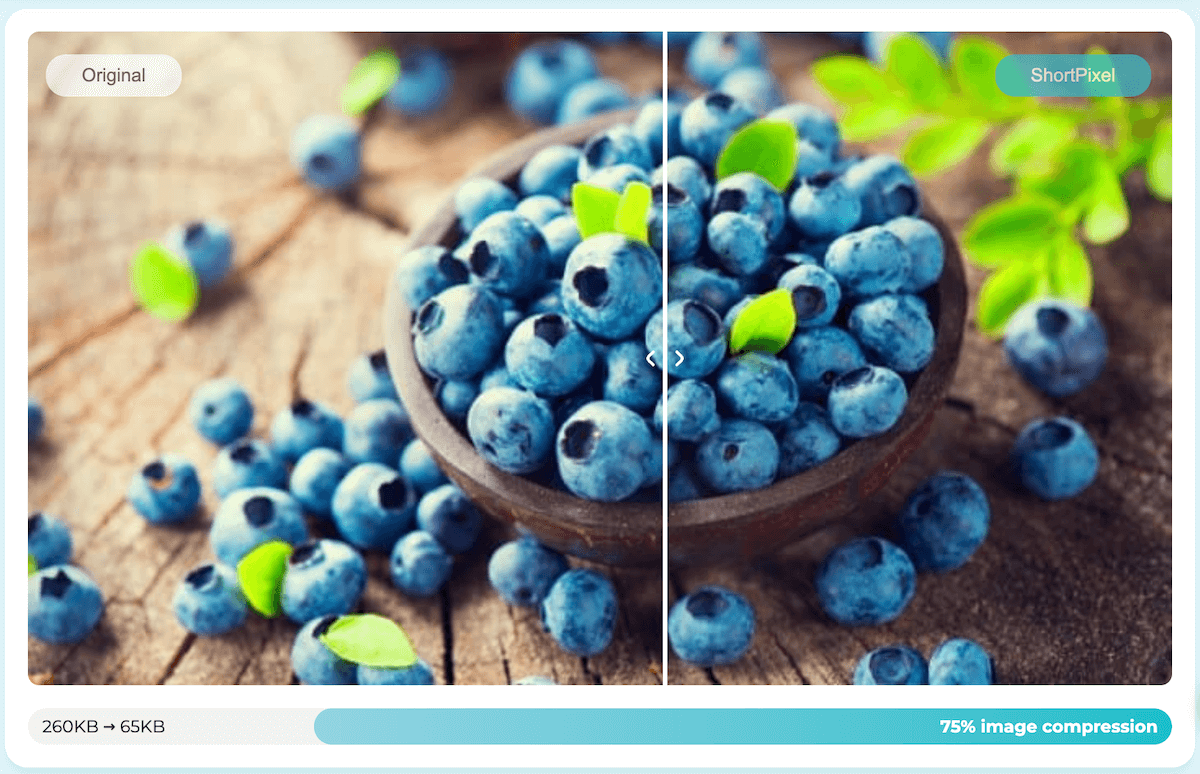
Compress before you upload. Plugin-level compression with a tool like Shortpixel (which runs after upload) is useful, but it’s a secondary measure. Compress at the file level first using JPEGmini, Squoosh, or Imagify. WebP format is now supported by all major browsers and offers noticeably better compression than JPEG — use it with a JPEG fallback for older environments.
Set up a CDN. Cloudflare’s free tier is more than adequate for most photography sites. It serves cached copies of your images from locations near each visitor and includes basic security protections. High-traffic or internationally-focused sites may want a paid plan.
Add a caching plugin. Server-side caching means WordPress does less work on each page request. WP Rocket and W3 Total Cache are the most widely used; many managed WordPress hosts include equivalent caching natively.
Test on real devices. Browser developer tools give you an approximation of mobile behaviour — but they don’t replicate it. Run your gallery navigation through at least one iOS device and one Android before you launch, and do it again after any significant plugin or theme update.
Turning Portfolio Visitors into Booked Clients
A portfolio that impresses but doesn’t guide people toward getting in touch is only doing half the job. A few focused changes here can make a significant difference to how many of your visitors actually become clients.
Contact Forms
Keep them short. Name, email, event type, and approximate date are all you need for a first enquiry. Every extra field you add gives someone another reason to close the tab. Set up an auto-responder that acknowledges receipt and sets a realistic response window. This shows you’re organised and takes away the anxiety of wondering whether anyone actually got the message.
Offer at least two ways to get in touch. Some clients prefer email, some want to call, and younger clients increasingly expect a text option. Alternatively, you can use a dedicated WordPress booking plugin to automate bookings for you. Make all of these options visible on your contact page.
Pricing Pages
You don’t need to publish exact prices, but give people enough to know if they’re in the right ballpark. “Wedding packages starting from $X” lets prospective clients self-qualify without having to chase you for a quote on a budget that doesn’t work.
Use the pricing page to communicate the value and experience of working with you before you get to the numbers. Testimonials near your pricing are particularly effective here, addressing hesitations at exactly the right moment.
Portfolio Presentation
Put your best work first, not your most recent. Those first few images decide whether someone keeps scrolling or clicks away.
Show range within your specialty. A wedding portfolio with nothing but outdoor summer ceremonies gives indoor, winter, or non-traditional couples less reason to reach out. Mix venues, seasons, lighting conditions, and styles.
And place calls to action throughout the portfolio, not just at the bottom of the page. Someone who’s spent five minutes admiring your galleries shouldn’t have to hunt for a way to contact you.
Frequently Asked Questions
Yes, FooGallery has a free version in the WordPress plugin directory that includes core gallery creation and customization, multiple layout options (including masonry and justified), lazy loading, retina support, and basic lightbox integration. PRO plans (Starter, Expert, and Commerce) unlock premium layouts, video support, advanced filtering, WooCommerce integration, watermarking, and more.
This will depend on your gallery needs. The free version covers basic gallery creation and includes password-protected client galleries. The Expert plan includes features like filtering and video, while the Commerce plan adds WooCommerce integration for digital downloads and print sales on top of that.
Masonry is usually the strongest choice — it handles mixed portrait and landscape orientations without any cropping. Justified layouts are a solid alternative if you prefer clean, consistent horizontal rows. Both are available in the free version of FooGallery.
FooGallery lets you create password-protected galleries hosted on your own domain. You share the URL and a unique password with each client. If you also want to sell digital downloads, FooGallery’s Commerce plan integrates with WooCommerce to handle the purchase and download process automatically.
In a good way, yes. FooGallery is optimised for Google’s Core Web Vitals — including Largest Contentful Paint, which directly impacts search rankings on image-heavy pages. Built-in lazy loading keeps initial page weight down. You’ll still want to optimise image filenames and alt text before uploading, as covered above.
FooGallery includes a built-in lightbox, but also integrates with both the free and pro versions of FooBox (FooPlugins’ dedicated WordPress lightbox plugin) as well as other popular lightbox plugins. This supports full-screen image viewing, video embedding, social sharing, and deep linking, depending on both the lightbox and FooGallery plan you are using.
WooCommerce is the recommended ecommerce layer for print sales and digital downloads on WordPress. FooGallery’s PRO Commerce plan includes native WooCommerce integration, so clients can purchase images directly from your gallery. WooCommerce itself is free; fulfillment partners like Printful charge per order.
Set Up Your WordPress Photography Website with FooGallery
A WordPress photography website that genuinely books clients is built around three things working together: a fast, well-organised portfolio that earns trust quickly; a professional client delivery experience that reinforces the quality of your work; and a local SEO foundation that makes sure the right people can actually find you.
FooGallery covers the gallery and delivery side — from free masonry layouts and lazy loading all the way through to password-protected client galleries and WooCommerce-powered digital sales.
Want to transform your photography portfolio? Start a free FooGallery trial today.
FooGallery WordPress gallery plugin
Build a photography site that books clients
FooGallery is an easy-to-use WordPress gallery plugin with stunning gallery layouts and a focus on speed and SEO.