
Customize Appearance

For each of the bar types, you can adjust the basic appearance of the bar. The below image shows you the basic appearance settings:
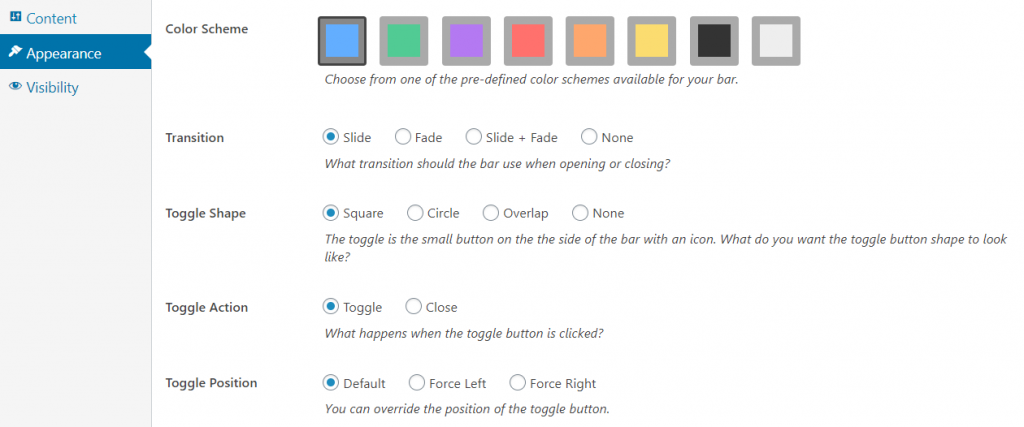
foobar appearance

Your first option is to choose your color scheme. You have 6 colors to choose from, along with black and white, giving you enough flexibility to choose a color that suits your needs. For example, you can choose yellow or orange for a Warning, while purple or red could help make your CTA stand out.

The Transition determines how the bar appears, when opening or closing. You can select Slide or Fade, Slide and Fade, or select None for no transition effect.

Resources

Find the right next step

Use this grid for documentation indexes, support routes, account links, affiliate resources, and download pages.

Documentation

Search setup guides, product docs, and troubleshooting articles.

Support

Open a ticket with product details so we can help quickly.

Licensing

Review account, renewal, refund, and license information.

Pricing update

Monthly & Lifetime plans are currently not unavailable

We’re not offering these payment options right now. Leave your name and email and we’ll let you know as soon as they return.

NameEmailNotify Me

No spam - Unsubscribe anytime