

WordPress CSS Hover Effects
FooGallery lets you add CSS-style hover effects to WordPress gallery images without touching code.
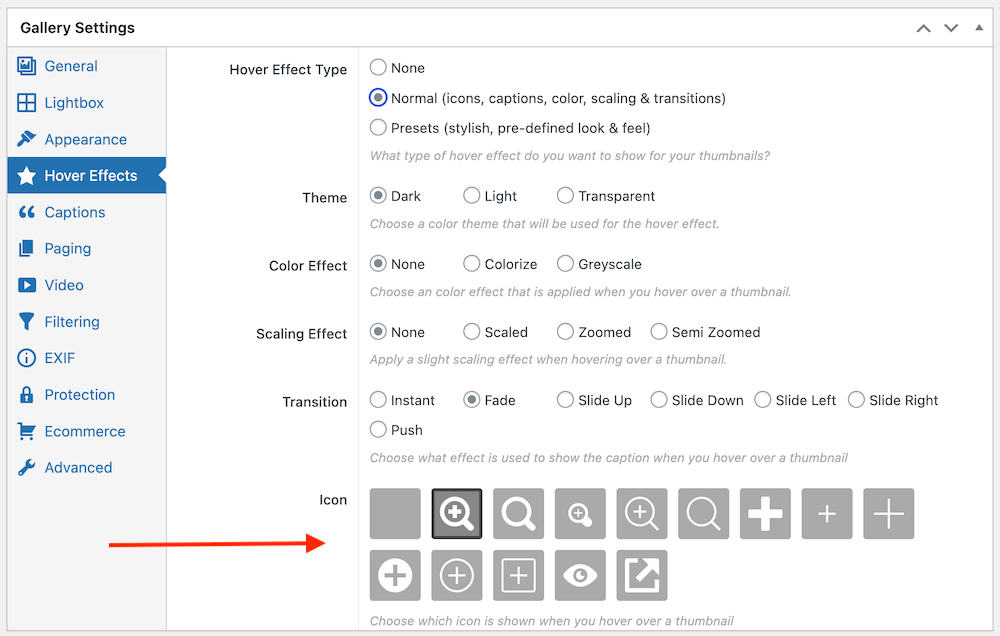
Choose hover effects inside gallery settings.
Use effects such as colorize, tint, icon, greyscale, zoom, push, and scale from the live examples.
Upgrade when you want PRO hover presets and expanded styling combinations.
Free included
100K active installs
4.8 / 5 rating
980+ reviews
Live demos
See WordPress CSS Hover Effects
Use the demos below to see how you can add CSS Hover Effects with no code.
Demo 1 – Colorize + Zoom





This demo uses a colorize + zoom hover effect. The caption text is also set to “Slide Down” & icons are turned off.
Demo 2 – Dark Tint Overlay
This demo shows a dark tint on hover. The caption text is also set to fade in on hover.
Demo 3 – White Tint + Scale
This demo shows a white tint on hover, with a scaling effect. The caption text is also set to “Slide Up” on hover.
Demo 4 – Icon + Greyscale + Zoom
This demo shows an icon, together with a greyscale thumbnail that zooms slightly on hover.
You can choose from 14 different icons, and also change the size.
Demo 5 – Icon + Push
This demo shows an icon, together with a caption that pushes the image out of view on hover.
Who this is for?
For galleries that need hover polish without hand-coding CSS.
Use CSS-style hover effects when thumbnails should reveal motion, captions, or visual feedback on interaction.
- DesignersAdd hover behavior without writing custom CSS for every gallery.
- Portfolio sitesMake image grids feel more interactive while keeping the page clean.
- Marketing pagesUse hover feedback to encourage visitors to explore gallery items.
Availability
FooGallery Free includes this feature.
This feature is available in FooGallery Free, and every paid plan includes it too.
Included
Free
FooGallery Free includes this feature.
Also included
PRO Starter
PRO Starter includes all Free features.
Also included
PRO Expert
PRO Expert includes all PRO Starter features.
Also included
PRO Commerce
PRO Commerce includes all PRO Expert features.
Ready for the next step?
Read through the relevant documentation or download to immediately get started
Upgrade path
Compare Related FooGallery Features
Check out these related FooGallery features to improve your WordPress galleries

Animated Hover Effect Presets
FooGallery Pro Starter comes with a selection of pre-styled hover effects. These unique hover presets save you from having to style your own and add a unique style to your galleries.
Thumbnail Background Fill
FooGallery PRO's advanced features include a thumbnail fill option, which doesn't crop your images in the thumb, and instead fills the space around them.

Slider Layout
Display gallery images in a slider layout.
FAQs
Frequently Asked Questions
Answers to common questions about WordPress CSS Hover Effects.
FooGallery lets you add CSS-style hover effects to WordPress gallery images without touching code. Choose hover effects inside gallery settings.
Yes, FooGallery Free includes a number of hover effects; PRO Starter adds hover presets. Download FooGallery Free to start using this feature, then compare PRO plans when you need advanced controls.
FooGallery PRO lets you choose from a number of great looking presets, which cannot be configured in FooGallery Free without adding custom CSS. Have a look at the demo.
Not for the free hover effects in the first 5 demos above.
Check out the hover effect presets in this demo.
Start free
Build this gallery with FooGallery Free
WordPress CSS Hover Effects is available in FooGallery Free. Install the plugin when the demo matches your site, then upgrade when you need more advanced controls.