

Animated Hover Presets for WordPress Galleries
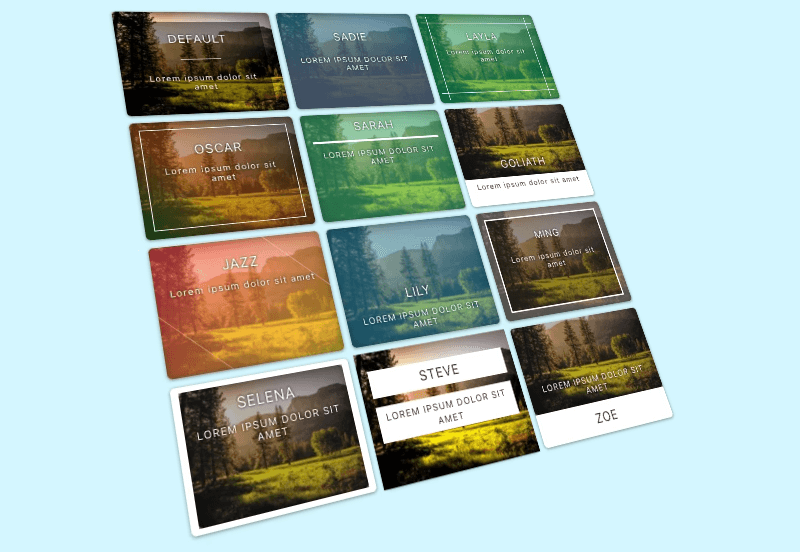
Hover presets are pre-styled hover effects that save you from designing every hover state manually.
Use pre-styled hover effects from our preset library.
Default hover effects are available in FooGallery Free.
PRO Starter adds animated hover presets.
PRO Starter required plan
100K active installs
4.8 / 5 rating
30-day guarantee
Live demo
See Animated Hover Presets Demo
Use the demo below to see how Animated Hover Presets behaves in a real FooGallery layout.
Sadie



Layla
Oscar
Sarah
Goliath
Jazz
Lily
Ming
Selena
Steve
Zoe
Interact with the gallery above to evaluate the layout, browsing flow, and lightbox behavior.
Who this is for?
For galleries that need polished interaction without custom design.
Use hover presets when thumbnails should respond with clear motion, captions, or visual feedback.
- Design-focused sitesAdd interaction to gallery thumbnails without writing custom hover CSS.
- Portfolio pagesReveal titles, captions, or effects only when visitors engage with an image.
- Marketing pagesMake galleries feel more active while keeping the layout clean.
Availability
Check the FooGallery plan for this feature.
Check the minimum FooGallery plan, course, or add-on before choosing your next step.
Not included
Free
This feature is not included in FooGallery Free.
Minimum plan
PRO Starter
PRO Starter includes this feature.
Also included
PRO Expert
PRO Expert includes all PRO Starter features.
Also included
PRO Commerce
PRO Commerce includes all PRO Expert features.
Ready for the next step?
Read through the relevant documentation or head over to our pricing to get started
Related features
Compare Related FooGallery Features
Check out these related FooGallery features to improve your WordPress galleries

Client Proofing
Let clients approve, reject, and leave notes on gallery images, then submit their final selection.
Color Sorting
Extract dominant colors from your images, then use the dominant color to sort and add tinted backgrounds to your galleries.
Custom Captions
Are you looking for a quick way to add custom captions? FooGallery PRO Expert allows you to add custom captions to images inside your WordPress galleries.
FAQs
Frequently Asked Questions
Answers to common questions about Animated Hover Presets.
Hover presets are pre-styled hover effects that save you from designing every hover state manually. Use pre-styled hover effects such as Sadie, Layla, Oscar, Sarah, Goliath, Jazz, Lily, Ming, and Selena, as shown in the examples above.
You will need at least the FooGallery PRO Starter plan to use the Hover Presets. Use the compare plans page to decide which plan is the best fit for your needs.
The Hover Presets are all pre-styled hover effects; select the option you like best for your gallery and it is applied to all gallery thumbnails to display on hover. CSS hover effects can be used as well, but you will need to manually add the CSS to each gallery to use this. You can use CSS to create hover effects in FooGallery Free, but it is advisable to get a developer to implement this for you. Hover Presets can be applied with the click of a button.
Ready when you are
Ready to use Animated Hover Presets Demo?
Compare FooGallery PRO plans to confirm this feature is available and choose the license that fits your site.