

The latest FooGallery release includes some exciting new additions and updates. There have been improvements across all the FooGallery plans, but most notable are our two new FooGallery PRO layouts: Wall PRO and Mosaic PRO.
Both new layouts give you different ways to present a photo collection. Mosaic mixes tile sizes and can give favorite images more space. Wall introduces the collection through drifting photo columns, either inline or behind a section.
On top of that, there’s a new pop-out preview window, updated layouts for Slider and Grid PRO, native Divi 5 integration, as well as practical fixes, better browsing, security improvements and more. Below we take a look at what you can expect from this update.
Mosaic: a Tiled Collection with Selected Highlights
Give your strongest images room to stand out with Mosaic PRO, a layout that combines responsive tiles with favourite-image selections to create a gallery with a more deliberate visual hierarchy. Mosaic is useful when a collection contains portrait and landscape photos and you want more visual variety than equally sized thumbnails. The tiles adapt to the available width, while favourite stars let you influence which photos get more room.

- Control the density: choose how many images fit into the space, then adjust the gap between them.
- Mark favourites: let the layout choose prominent images as well as your favourites, or limit that preference to your starred photos.
- Keep the full photo available: configure thumbnail links and a lightbox so visitors can inspect individual images.
- Check phones: use supported mobile density and gap overrides when the smaller arrangement needs a different balance.
Using the favorite feature gives an image a preference rather than making it a fixed tile size. The photo proportions and available space will therefore still affect the arrangement. It’s advisable to start with a small selection of highlights and then compare both desktop and phone previews. Follow the Mosaic setup guide for the editor controls and troubleshooting.
Wall: a Moving Introduction to Your Photos
Turn a collection of photographs into a moving backdrop. Wall PRO brings your images together in an animated photo wall with columns of gently moving photographs from your collection. It can sit behind a section’s content or appear as a standalone gallery, making it useful for photography portfolios, landing pages, event highlights and visual introductions.



























Demo – Wall Layout PRO
Device preview switcher available on desktop devices
This live Wall example shows the motion and photo-click behaviour. Select a photo to open the fullscreen gallery, or open the dedicated Wall demo to see its setup settings.
- Set the pace: choose the speed and direction, adjust tilt and gaps, and enable pause on hover for pointer users.
- Choose the click action: open the lightbox directly, open a fullscreen gallery first, dispatch an event for custom code, or keep the wall decorative.
- Keep section content readable: give a background section enough height and use suitable shading and text contrast.
- Respect different devices: adjust mobile columns and check reduced-motion preferences, which intentionally produce a still wall.
The live demo opens a fullscreen gallery when a photo is selected. From there, another selection opens the photo in the lightbox. If you prefer a background that does not compete with your page actions, choose the decorative click setting. Read the Wall setup guide for inline and background options.
Which layout should you choose?
- Choose Mosaic when visitors should browse a collection with varied tiles and a few stronger visual highlights. Think travel stories, mixed photography portfolios and project collections.
- Choose Wall when the collection should introduce a page through motion. Think homepage sections, creative landing pages and portfolio introductions.
- Choose another layout when you need a different browsing experience: regular grids, aligned rows, framed-photo cards or a focused viewer can still be a better fit depending on your specific needs.
Slider PRO and Grid PRO have also both seen updates. You can now give Slider PRO a look that fits your website: new border, corner, shadow and thumbnail controls offer more styling flexibility, while improved sizing and mobile navigation help the finished gallery feel more consistent. New Grid PRO galleries start with refreshed defaults: dark styling, six columns and image panels designed to fit the available screen space. (Note: this doesn’t impact existing Grid galleries.)
Both new layouts are included in PRO Starter, Expert and Commerce (along with Grid, Slider, Polaroid and Spotlight). See the six-layout comparison for the full set of demos and selection advice or compare the plans if you also need filtering, video or selling tools.
Try the layouts with your own collection
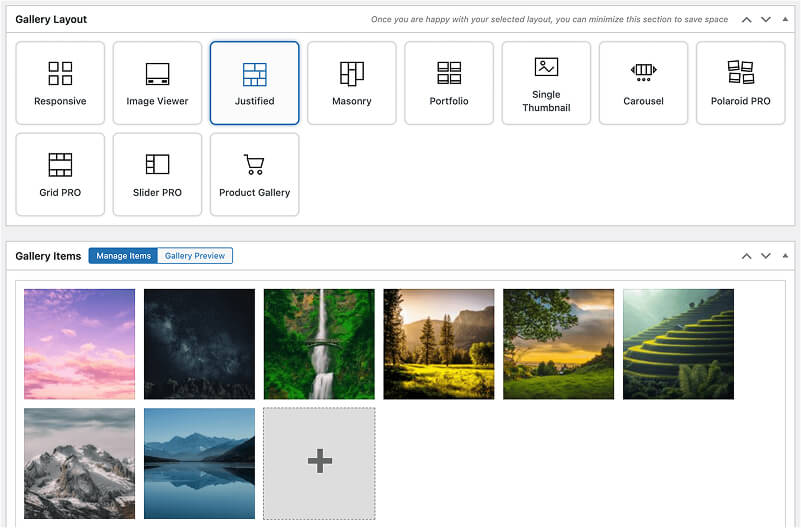
- Open an existing gallery or create a new one, then choose Mosaic PRO or Wall PRO in the layout selector.
- Start with the layout defaults and change one setting at a time. Add useful titles, captions and alt text to the photos.
- Check the gallery in desktop and mobile previews, save, and embed it with a FooGallery block or generated shortcode.
- Test the public page, including any fullscreen view, lightbox and reduced-motion behaviour.
The seven-day PRO trial includes all PRO features so you can test both layouts with your own photos before choosing a plan. Separate add-ons are not included in that trial. Start with the Mosaic demo and Wall demo, then use the setup guides when you are ready to build.
FooGallery WordPress gallery plugin
Choose a layout for your next photo collection
FooGallery is an easy-to-use WordPress gallery plugin with stunning gallery layouts and a focus on speed and SEO.
A Better Viewing Experience
The latest update brings with it an improved Gallery Previews. you can now keep your gallery preview beside your settings as you work. The new pop-out preview window follows unsaved gallery changes and offers desktop, tablet and mobile views. Customers can also change the preview background colour, making it easier to judge borders, transparent areas and light or dark gallery styling.
Here are the improved features:
- The window reconnects after the editor reloads, and inline previews pause while the external preview is active.
- There is a new Auto-update preview checkbox. Users can leave it enabled for immediate feedback or pause updates while making several changes, then refresh manually.
- Preview controls stay out of the way while managing images.
- Returning to Gallery Preview refreshes the latest changes, even if auto-update is off.
- The refresh icon indicates when the preview is out of date.
- Rapid edits queue the latest refresh, preventing overlapping requests and older results replacing newer ones.
Gallery Appearance Upgrades
There is a new Inner Rounded Corners setting which allows for the rounding of the image (rather then the existing outer frame setting). This gives customers more control when combining photographs, borders and backgrounds. Extra Large Rounded Corners are also available in more layouts, including the Image Viewer. Corner controls are available for FooGallery Free and PRO where supported.

Make browsing feel more fluid with Morph animations, where images move naturally into place as visitors change pages or refine a gallery selection.
- For pagination, photographs glide into position when changing pages, or images added through Load More or infinite scrolling fade into view.
- With filtering, the remaining photographs move into their new positions while images enter or leave the selection.
Existing galleries will retain their instant transitions unless customers choose to change them. These page animations are available through the shared pagination controls, but Morph filtering requires PRO Expert or higher.
More Upgrades, Improvements, and Fixes
Native Divi 5 Integration: FooGallery now has a native Divi 5 module with a gallery selector and live gallery previews inside the builder. The integration also supports the conversion of existing legacy FooGallery modules, with handling for supported styling and any saved attributes. This allows for a more direct editing workflow for Divi users. This is available for FooGallery Free and PRO users.
Simpler Gallery Blueprint management: Updated Blueprint controls make it easier to see which galleries share settings and where a change will take effect. This is a FooGallery PRO Commerce feature.
A more consistent mobile and browsing experience: We’ve refined some of the small interactions that impact the browsing experience, from smoother Carousel transitions to keeping the same photograph open when a visitor rotates their phone.
Other updates include:
- More accurate Gallery Usage information with improved detection for nested blocks, single-quoted shortcodes and Elementor changes.
- Better layout switching.
- Cleaner editing on smaller screens: improved spacing and wrapping of gallery-editor controls.
- Privacy and security hardening: tighter checks to keep private and unpublished galleries out of public embeds.
Ready to Take Control of Your Galleries?
If you’re looking for an improved gallery experience, this FooGallery upgrade brings you more versatile layouts, improved creative control and better user experience. Update to FooGallery 3.3.34 today.
Interested in FooGallery PRO? If you want to try out the new PRO layouts, add Morph animations to your gallery, or use any of oyr other pro features, you can take FooGallery PRO for a spin when you start a free trial.
FooGallery WordPress gallery plugin
The Best WordPress Gallery Plugin
FooGallery is an easy-to-use WordPress gallery plugin with stunning gallery layouts and a focus on speed and SEO.