

FooGallery Lightbox
FooGallery Lightbox is built into FooGallery to give gallery images more styling and viewing flexibility without installing a separate lightbox plugin for the gallery.
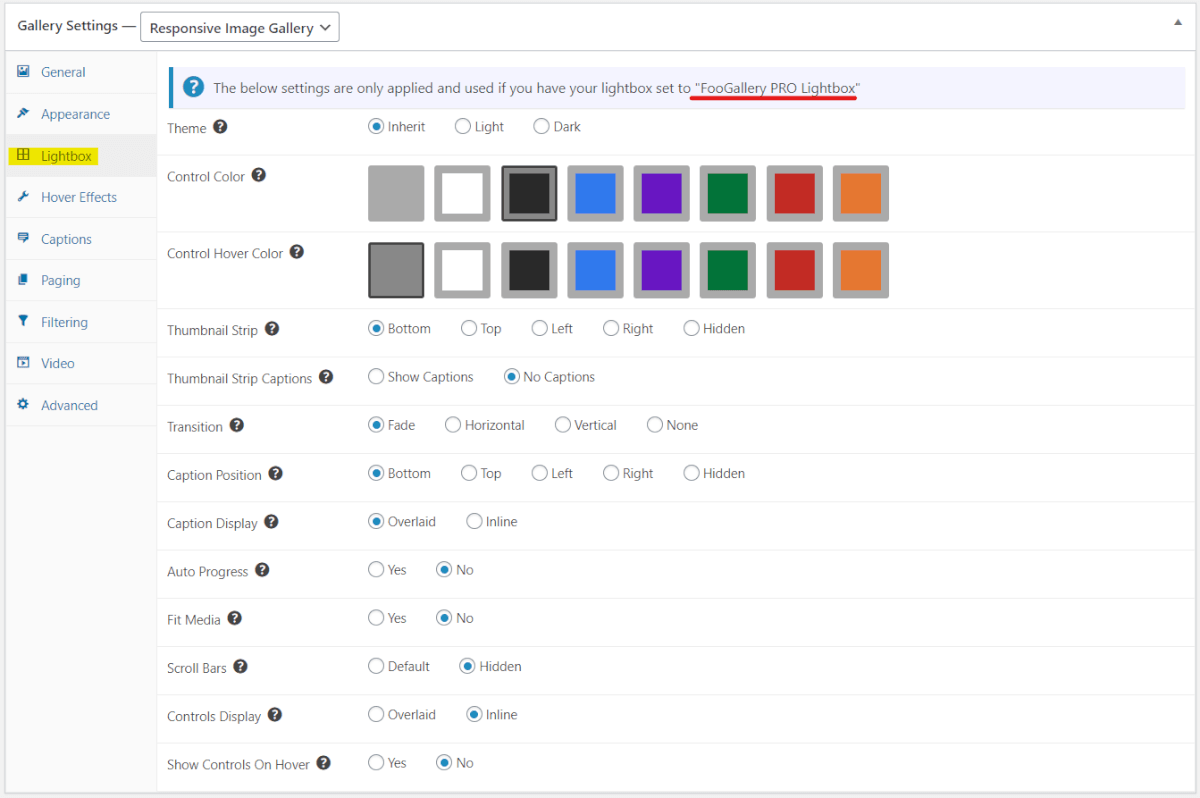
Customize lightbox colors and themes.
Use a thumbnail strip, auto progress, captions, and transitions where supported.
Use FooBox separately when you need a standalone lightbox for more content types.
Free included
100K active installs
4.8 / 5 rating
980+ reviews
Live demo
See FooGallery Lightbox
Use the demo below to see how FooGallery Lightbox behaves in a real FooGallery layout.










Interact with the gallery above to evaluate the layout, browsing flow, and lightbox behavior.
Who this is for?
For galleries where visitors need a better image viewing experience.
Use the FooGallery lightbox when images should open in a focused overlay with clean navigation.
- PhotographersLet visitors inspect larger images without leaving the gallery page.
- Product sitesShow image details, angles, and supporting visuals in a focused overlay.
- Content creatorsKeep readers on the page while giving images room to be viewed properly.
Availability
FooGallery Free includes this feature.
This feature is available in FooGallery Free, and every paid plan includes it too.
Included
Free
FooGallery Free includes this feature.
Also included
PRO Starter
PRO Starter includes all Free features.
Also included
PRO Expert
PRO Expert includes all PRO Starter features.
Also included
PRO Commerce
PRO Commerce includes all PRO Expert features.
Ready for the next step?
Read through the relevant documentation or download to immediately get started
Upgrade path
Compare Related FooGallery Features
Check out these related FooGallery features to improve your WordPress galleries.

Grid Layout
A grid display with the full-size image opening in the gallery.

User Uploads
Let visitors submit images into a gallery workflow.
WooCommerce Integration
With WooCommerce integration, FooGallery PRO Commerce gives you the ideal platform from which to display your product images. Visit now!
FAQs
Frequently Asked Questions
Quick answers about using FooGallery Lightbox with your WordPress galleries.
No. FooGallery Lightbox opens images inside FooGallery galleries. FooBox remains the standalone lightbox plugin when you need to open images, video, HTML, forms, or other content outside a gallery.
No separate lightbox plugin is required for FooGallery galleries. FooGallery Free includes built-in lightbox support, and paid plans add more advanced gallery workflows and controls.
You can customize lightbox colors and themes, then use supported gallery options such as captions, thumbnail navigation, transitions, and auto progress where they fit the gallery layout.
FooGallery Lightbox is designed for FooGallery layouts that support image lightbox viewing. Use the demo and documentation to confirm the behavior for the gallery layout you want to use.
Use FooBox when you need a standalone lightbox for content beyond FooGallery images. Use FooGallery Lightbox when the goal is to improve image viewing inside a FooGallery gallery.
Ready to get started?
Download FooGallery Free and open images in a better lightbox
Install FooGallery Free to use the built-in lightbox with your galleries, then upgrade later if you need more advanced gallery workflows.