
Add Frontend Uploads with Moderation to FooGallery
User Uploads adds a controlled front-end upload flow to FooGallery so visitors can submit images & video while site owners keep moderation, limits, and form fields under control.

FooGallery add-on
Compatible free & pro
30-day guarantee
Live Demo
Add an Upload Form To Your WordPress Galleries
The demo below shows the public upload flow. Anyone can upload an image, and the site admin can moderate all submissions.























UGC workflow
User Generated Content for WordPress Galleries
FooGallery User Uploads is built for user-generated photo campaigns, competitions, client submissions, and community galleries where every upload still needs rules.
Community
Invite uploads from visitors.
Place the upload form after a gallery or embed it with a shortcode where the campaign needs submissions.
Lead capture
Collect useful submitter details.
Request names, email addresses, image metadata, tags, captions, descriptions, and custom URLs.
Moderation
Approve what appears publicly.
Review uploads per gallery or from the central Moderation screen before approved media is added to the Media Library and gallery.
Compatability
User Uploads Add-on works with
FooGallery Free or PRO
The add-on supplies the upload, field, moderation, and confirmation workflow to any FooGallery gallery.
Supported
FooGallery Free + User Uploads
Add front-end image submissions to standard FooGallery galleries.
Supported
PRO Starter + User Uploads
Use upload workflows alongside Starter layouts and options.
Supported
PRO Expert + User Uploads
Use uploads with Expert gallery capabilities when the gallery needs them.
Supported
PRO Commerce + User Uploads
Use uploads alongside Commerce gallery features when selling or product-gallery workflows are involved.
User Uploads Features
Collect Media Without Opening
WordPress admin
The add-on creates a front-end path from upload form to moderation queue to published gallery item.
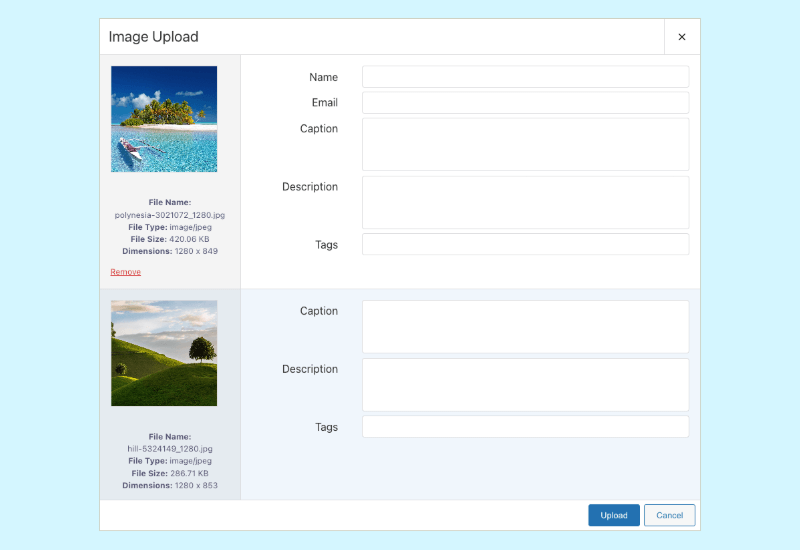
Let visitors upload from front end
Add the upload form below a gallery or place it with a shortcode for a dedicated submission page.
- Collect user names and email addresses when needed.
- Capture captions, descriptions, alt text, tags, and custom URL fields.
- Keep users out of the WordPress admin while still collecting gallery media.
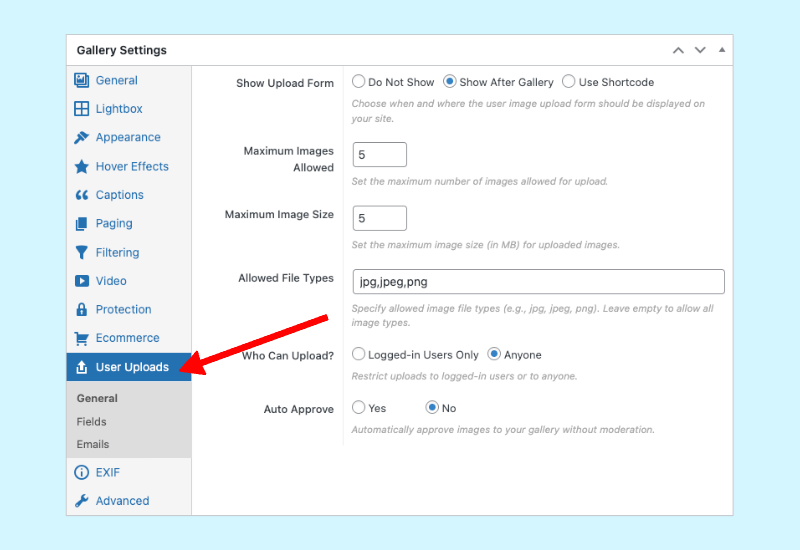
Set upload limits and permissions
Control who can upload and how much they can submit before the gallery receives anything.
- Allow anyone to upload or require logged-in users.
- Set maximum file size and maximum upload count.
- Choose whether uploaded images need manual approval before they appear.
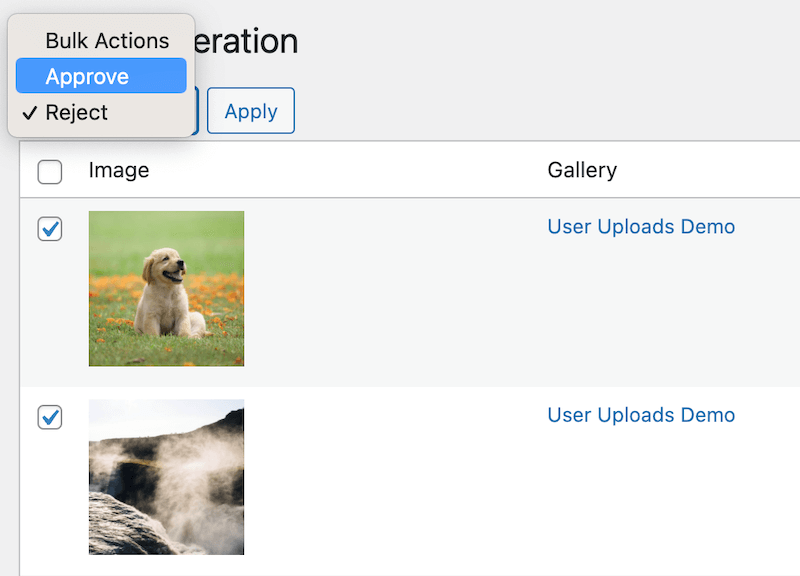
Approve, reject, or bulk process submissions
Review submissions from the gallery or central Moderation tab before publishing them.
- Approved uploads are added to the Media Library and gallery.
- Rejected uploads are not added to the gallery.
- Send email confirmations when submitter email addresses are collected.
Pricing
FooGallery User Uploads Add-on Pricing
The User Uploads add-on is sold annually by site count and includes the current 7-day free trial and 30-day money-back guarantee terms from the product profile.
Most Popular
User Uploads – 5 Sites
User-generated galleries for a small portfolio of sites.
Works with Free and Pro plans
Allow visitors to upload media
Images & Video uploads
Capture leads with uploads
Configure Uploads Rules + Fields
Moderation before publishing
Customize Email Notifications
Increases Visitor Engagement
Decreases Bounce Rate
$89.99
$
89
.99
/ year
Most popular license.
Lifetime is a one-time payment for the selected plan and site allowance.
7-day free trial + 30-day money-back guarantee
FAQ
WordPress image upload plugin questions
Answers are based on the current User Uploads landing page, FooGallery User Uploads documentation, and the live add-on pricing data.
Use FooGallery with the User Uploads add-on. It adds a front-end upload form that can appear after a gallery or be embedded with a shortcode, then routes submitted images through the add-on workflow.
Yes. By default uploads only allow images, but you can enable mp4 video uploads too. Videos also go through the same moderation queue as images, if enabled. Videos are also saved to the media library after they have been approved.
Only if you enable automatic approvals. By default, site owners will have to review uploads and approve or reject them before approved images are added to the Media Library and shown in the gallery.
Yes. User Uploads includes controls for logged-in-only uploads, maximum upload size, and maximum upload count so submission rules are set before visitors use the form.
Yes. The add-on can collect names, email addresses, captions, descriptions, alt text, tags, and custom URL information. Email collection also supports approval or rejection confirmation messages.
No. User Uploads is a separate add-on that works with FooGallery Free or any PRO plan. Choose PRO only if the gallery also needs PRO-only layouts, filtering, video, dynamic sources, or Commerce features.
Purchase User Uploads for FooGallery
Allow your visitors to upload images and video from the frontend. You moderate submissions.