
Most WooCommerce stores lose the majority of their visitors without a single click, signup, or sale. Shoppers browse, hesitate, and leave, often forever. WooCommerce popups are one of the most direct ways to change that. A well-timed popup can recover an abandoned cart, push a shopper over the line with a free shipping offer, or capture an email before someone disappears.
But “well-timed” is the operative phrase. Popups that fire the moment a page loads, show to every visitor regardless of context, or look like they were designed by a different website entirely, do the opposite. They frustrate, and they bounce.
This guide covers the types of WooCommerce popups that actually drive conversions, the features that separate effective from annoying, and how to implement them using FooConvert, a WordPress popup plugin built specifically for ecommerce stores.
Why WooCommerce Stores Need Popups
The average ecommerce cart abandonment rate sits at around 70%, according to data from the Baymard Institute. That means roughly seven out of every ten shoppers who add something to a cart leave without buying. Email, retargeting ads, and SEO can all help bring some of those shoppers back, but those channels take time, cost money, and are reliant on having captured the visitor’s details in the first place.
WooCommerce popups work differently. They engage visitors while they are still on your site, at the moment when intent is highest. A popup triggered by exit intent, for example, fires right as a visitor moves to close the tab, which is the precise moment where a well-crafted offer can change the outcome.
The same logic applies to lead capture. If a visitor browses your store, doesn’t buy, and leaves without giving you their email, you have no way to follow up. A popup offering 10% off in exchange for an email address turns a lost session into a future customer.
The key is precision. Popups that fire based on user behavior, appear on the right pages, and are targeted to the right audience are what convert. Generic, poorly timed popups are just noise. There are different types or popups, and different popup mechanics, that make the difference; we cover all of this below.
Types of WooCommerce Popups That Actually Work
WooCommerce popup needs fall into a handful of clear categories. Here is a breakdown of each, with practical use cases.
Exit Intent Popups
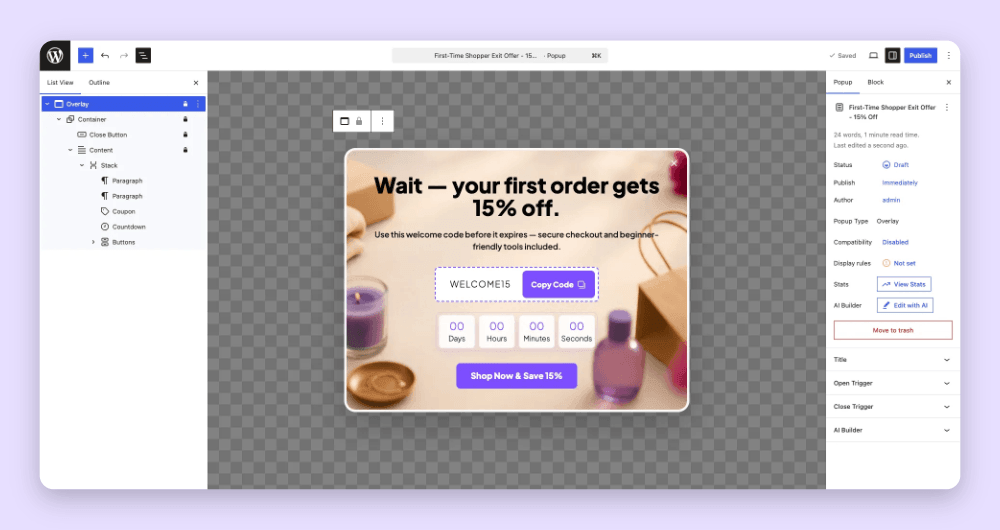
An exit intent popup fires when a visitor’s cursor moves toward the top of the browser, signaling they are about to leave. For WooCommerce stores, this is a critical moment. An offer at this point, such as a discount code (as in the below example), free shipping, or a simple “wait, before you go” message, gives the store one last chance to convert.
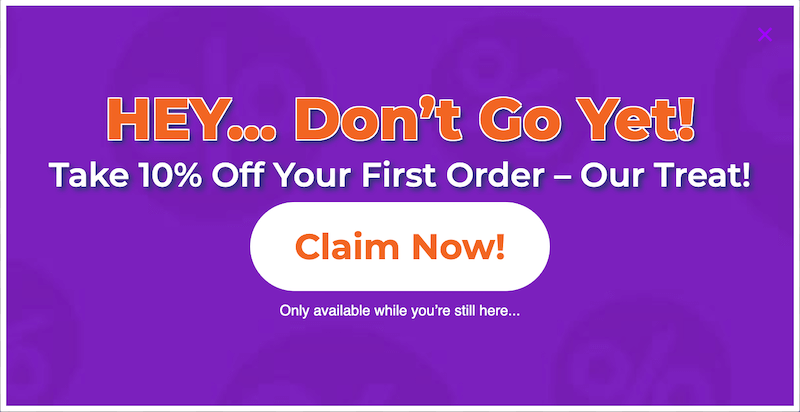
FooConvert includes a Smart Exit Popup template with exit intent trigger configured out of the box. It is one of the most popular popup types for ecommerce for good reason: it targets visitors at exactly the moment they are about to become a lost sale.
Cart Abandonment Popups
Cart abandonment popups respond to WooCommerce cart events. When a customer removes a product from their cart, or when cart activity stalls, a popup can appear to re-engage them. This might be a reminder of what they are leaving behind, a limited-time coupon, or a free shipping threshold prompt.
With dedicated WooCommerce cart triggers (including cart updated, product removed from cart, and cart value thresholds) FooConvert PRO can target cart abandonment. Popups fire based on actual WooCommerce cart events, not just generic page behavior, which means they are far more precise (and far more effective).
Free Shipping Progress Bars
FooConvert PRO includes a Free Shipping Progress block that can be placed inside a bar or flyout popup. Combined with a cart value trigger, it appears at the right moment and gives shoppers a clear, tangible reason to keep going.
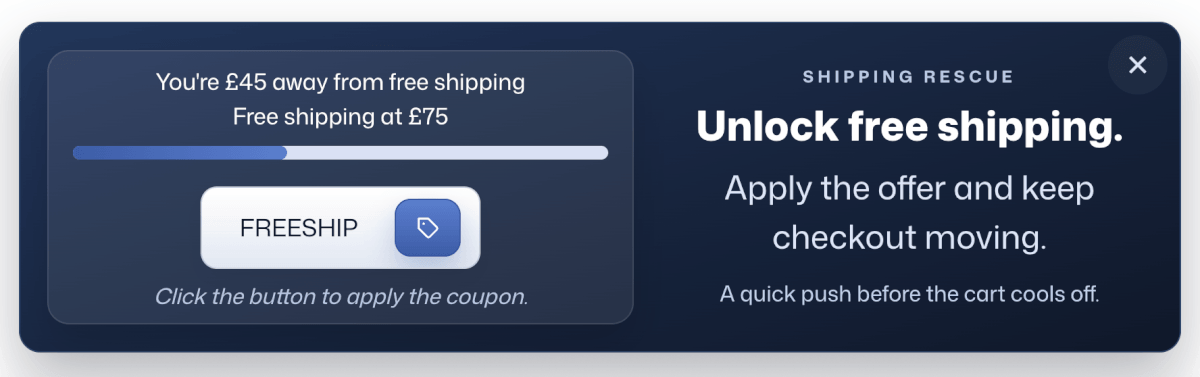
Free shipping is one of the most effective conversion incentives in ecommerce. A free shipping progress bar shows customers how close they are to qualifying, nudging them to add one more item rather than abandon the cart.
Upsell and Cross-Sell Flyouts
Once a product lands in the cart, the customer’s intent is confirmed. That is the ideal moment to suggest a complementary product or an upgrade. Flyout popups handle this well: they slide in without fully interrupting the browsing experience, surface the recommendation, and disappear if ignored.
Users can pair FooConvert’s Flyout template with the WooCommerce high product intent trigger, which fires based on signals that a visitor is seriously considering a product. With this combination, you can create upsells or cross-sells for a higher value checkout.
Checkout Exit-Intent Popups
Checkout abandonment is a separate problem from cart abandonment, and it deserves its own popup. A visitor who reached the checkout page had genuine purchase intent. If they start to leave, a last-chance popup with a coupon code, a reassurance message, or a “complete your order” prompt can recover the sale. FooConvert PRO includes a pre-built Checkout Exit Save Popup with WooCommerce checkout triggers already configured. There is no manual setup required for the trigger logic.
Coupon and Promotional Overlays
Overlay popups use the classic “modal” format: they appear over the page content and demand attention. Used well, they are ideal for time-sensitive promotions, seasonal sales, welcome discounts, and giveaways.
The Click-to-copy Coupon block in the free version of FooConvert lets visitors copy a discount code with one click. The plugin goes further with an Apply Coupon block, which applies the code directly to the WooCommerce cart, removing the friction of a customer having to find the coupon field themselves.
What Makes a WooCommerce Popup High-Converting?
The popup type matters, but the mechanics underneath are what actually determine performance. Here are the features worth looking for in any WooCommerce popup plugin.
Precise Targeting with Display Rules
Showing the same popup to every visitor on every page is one of the most common mistakes. A cart recovery popup shown on the homepage makes no sense. A “complete your order” message shown to a customer who just bought something is actively harmful.
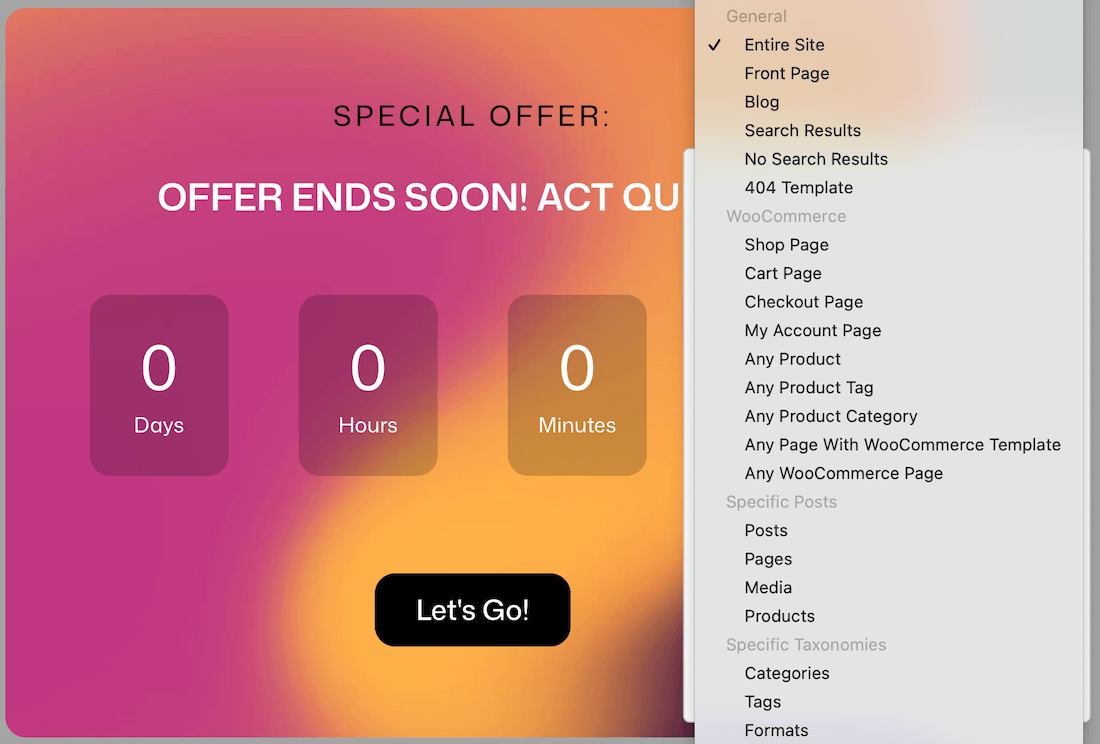
Good WooCommerce popup plugins allow you to target by location (specific WooCommerce pages: shop, product, cart, checkout, as shown below), by user type (logged-in vs. guests, or by customer role), and by session behavior (has the user already seen this popup?). With FooConvert PRO you can target WooCommerce-specific display rules for all of these. The “Only Show Once” setting is particularly important for user experience as a visitor who has already dismissed a popup should not have to see it again on every page.
Triggers That Fire at the Right Moment
Triggers determine when a popup appears. Page-load triggers are the bluntest instrument, often leading to frustration ; behavior-based triggers are far more effective because they respond to what the visitor is actually doing.
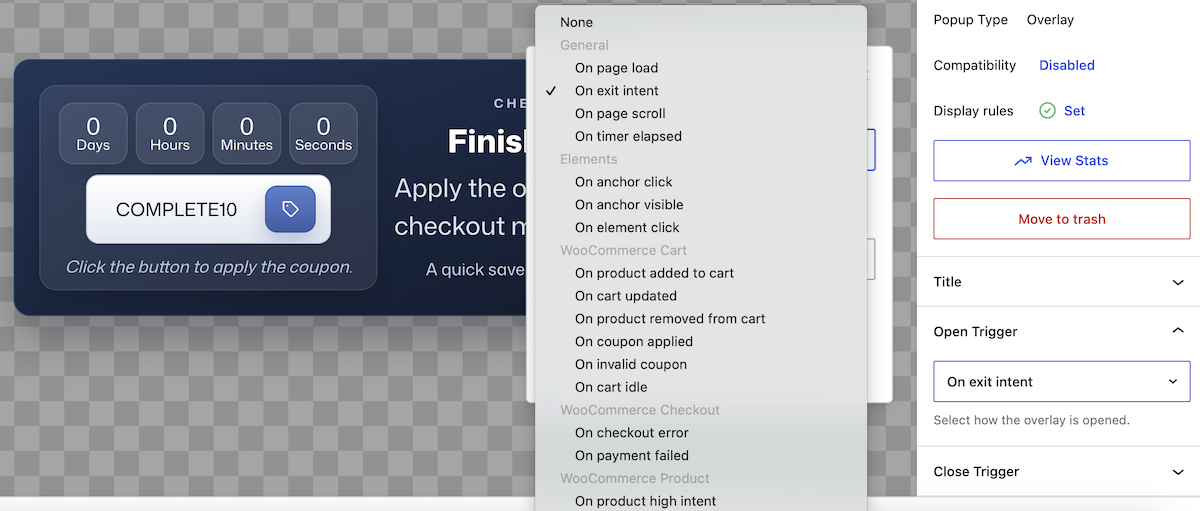
FooConvert’s trigger selection covers the full range: exit intent, scroll depth, time elapsed on page, element click, and anchor visibility. For WooCommerce specifically, PRO users get cart-based triggers (cart updated, product removed, cart idle), checkout triggers, and a high product intent signal. These are native WooCommerce events, which means the triggers fire at moments of genuine commercial intent rather than just generic page interaction.
On-Brand Design
FooConvert gives you a Brand Context Extractor. Before the AI generates any popup, you save your brand details: primary, secondary, and accent colors; heading and body fonts; button styles and spacing preferences; and your brand’s voice and offer style. Every popup the AI creates draws from this context.
Why does this matter? A popup that looks out of place instantly undermines trust. If the colors, fonts, and tone are inconsistent with the rest of your site, visitors notice and they are less likely to engage. With FooConvert’s brand extractor, results looks native to your site rather than AI-generated.
Mobile Responsiveness
More than half of all ecommerce traffic comes from mobile devices. A popup that covers the entire screen on mobile, is difficult to close, or breaks the layout will increase your bounce rate rather than improve conversions. All FooConvert popups are built to be fully mobile responsive by design.
How to Create WooCommerce Popups with FooConvert
FooConvert offers three ways to create WooCommerce popups, depending on how much control you want and how quickly you need to get started.
Option 1: Use a Pre-Built WooCommerce Template
FooConvert PRO includes pre-built WooCommerce popup templates with triggers and display rules already configured. Templates like the Cart Unlock Flyout and the Checkout Exit Save Popup are ready to go in minutes: install the plugin, choose the template, customize the copy and colors, and publish. The WooCommerce-specific logic is built in.
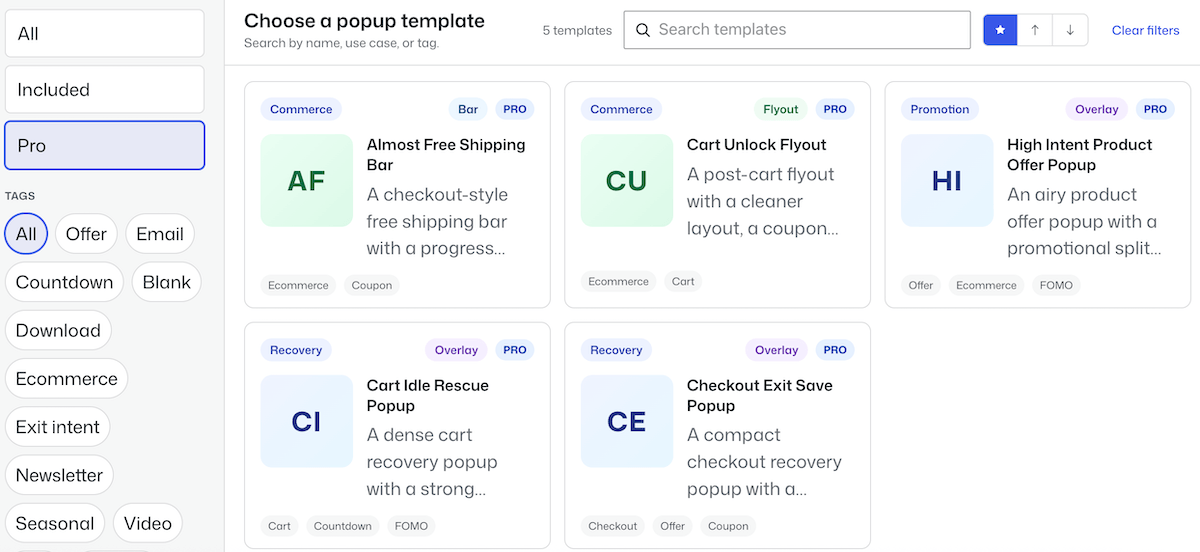
This is the fastest path for store owners who want reliable results without getting into settings and configuration.
Option 2: Build with the AI Popup Builder
FooConvert’s AI Popup Builder requires WordPress 7.0 and an AI connector, which can be OpenAI, Anthropic, Google, OpenRouter, or any community-built provider. You configure your AI key once in WordPress Settings and it is available across all AI-powered features.
The process works like this:
- Set up Brand Context. Extract your brand colors, fonts, button styles, and brand voice in FooConvert’s settings. This is a one-time setup.
- Describe what you want. Use your own words, for example: “Show a flyout on the cart page when a product is removed, offering 15% off if they complete their order.” Or pick from starter prompts for common campaigns.
- AI builds the popup. FooConvert generates a complete bar, flyout, or overlay with copy, layout, styling, triggers, and display rules, all matched to your Brand Context.
- Refine with natural language. Not happy with the headline? Want a different trigger? Tell the AI what to change. No digging through settings.
- Generate a background image (optional). If your AI connector supports image generation, FooConvert can generate a background image for your popup: gradients, textures, patterns, or colorful shapes.
- Publish. Everything lives in the block editor you already know. Make any final manual tweaks, then go live.
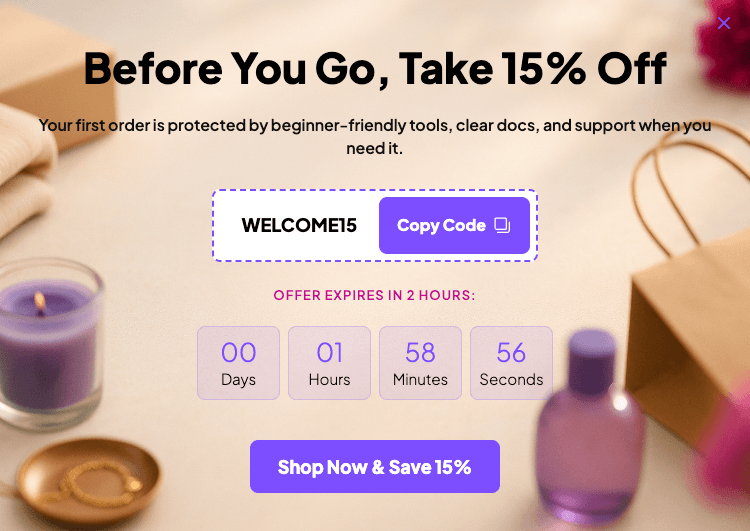
Here’s an example of what it can do:
Note
WordPress Requirements
If you are still on WordPress 6.x, the AI builder is the only feature that requires WordPress 7.0. Every other feature, including all 15+ templates, blocks, triggers, display rules, and analytics, works on WordPress 6.5 and above.
Option 3: Build from Scratch
For full manual control, FooConvert’s block editor lets you build any popup from scratch. Choose a popup type (bar, flyout, or overlay), add your conversion blocks, and configure triggers and display rules yourself.
Available conversion blocks include: Signup, Countdown, and Click-to-copy Coupon in the free version. FooConvert PRO adds the Apply Coupon block (which applies a code directly to the WooCommerce cart), a Free Shipping Progress block, and a Confetti block for celebratory moments like successful signups or order completions.
You can also add your own Google Fonts to any popup for more advanced typographic customization.
How to Know If Your WooCommerce Popups Are Working
Publishing a popup is just the start of the process. The difference between a popup strategy that compounds over time and one that stays flat comes down to measurement and iteration.
Built-In Popup Analytics
FooConvert tracks performance at the individual popup level. Metrics include views, clicks, click-through rate, engagements, conversions, and conversion rate. The dashboard surfaces top performers, sortable by engagement rate, clicks, or conversions, so you can see at a glance which popups are doing the work.
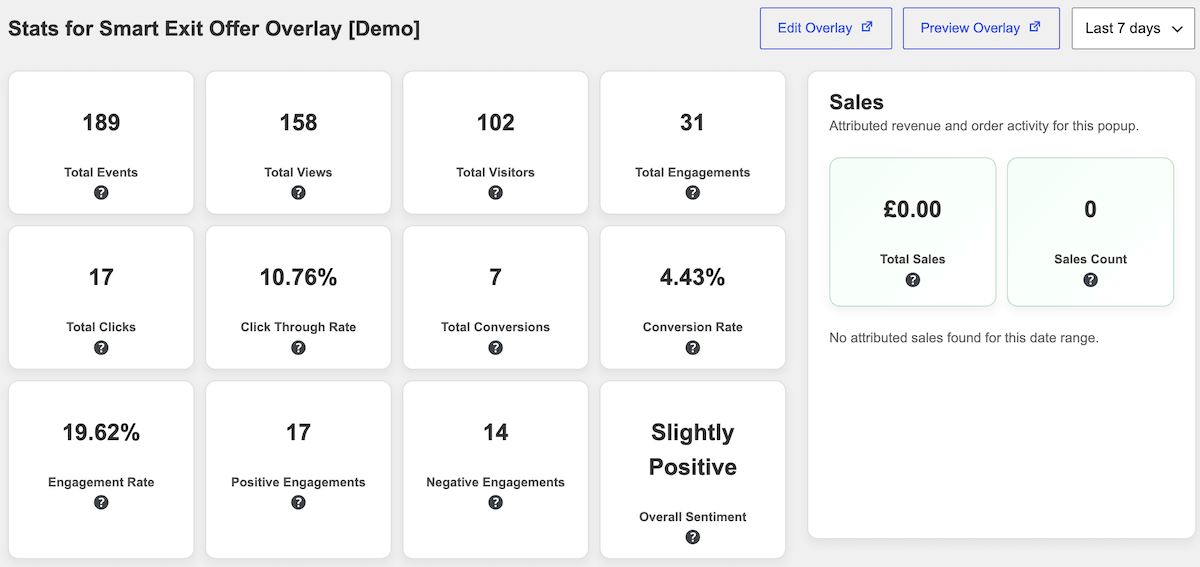
FooConvert PRO adds, among other stats, sales attribution. For each popup, you can see the number and total value of WooCommerce orders attributed to it. This is the number that matters most for store owners: not how many people clicked, but how much revenue that popup is actually responsible for. It makes the case for which popups to keep, which to retire, and where to invest time in optimization.
A/B Testing
Analytics tells you what is happening. A/B testing tells you what to do about it. FooConvert PRO includes an Experiments feature that lets you test multiple variants of any popup against each other.
The setup is straightforward: set a goal (clicks, leads, or conversions), a minimum view threshold, and an optional end date. Create variants that each change one element, such as a different headline, a different offer, or different trigger timing. FooConvert runs the test and, once the threshold is met, can automatically apply the winning variant with no manual intervention required.
Testing headlines, offers, and timing systematically is how popups go from “probably helping” to “provably driving revenue”.
FooConvert is owned and maintained by FooPlugins. When we mention or recommend FooConvert in this article, that relationship may influence how the product is covered; product details should be checked against current documentation, demos, pricing, and release notes.
WooCommerce Popup Mistakes That Hurt Conversions
The features above can all be undermined by a handful of common errors, but these can easily be avoided. Here’s what to look out for:
- Showing the same popup to every visitor. Use display rules to target relevant users on relevant pages. A cart recovery popup belongs on the cart page, not the homepage.
- Firing immediately on page load. Visitors who just arrived have not had a chance to express any intent. Use scroll depth, time elapsed, or behavior-based triggers instead of instant page-load popups.
- Not testing. Gut feel is not data. Set up A/B tests and let the numbers tell you which version of your popup works for your specific audience.
- Skipping mobile testing. Every popup should be reviewed on a real mobile device before going live. A poorly rendered mobile popup, or one that is hard to dismiss, is worse than no popup at all.
- Ignoring the analytics. Popup analytics exist to be acted on. Review performance regularly, retire popups that are not converting, and double down on the ones driving sales.
- Using generic-looking popups. A popup that looks inconsistent with your site reduces trust. Use Brand Context in FooConvert to ensure every popup looks like it belongs there.
FooConvert Free vs PRO for WooCommerce
FooConvert is available in both a free and a paid version. Here is how they compare for WooCommerce use cases.
| Feature | Free | PRO |
| AI Popup Builder | Yes | Yes |
| Brand Context Extractor | Yes | Yes |
| Bars, flyouts, overlays | Yes | Yes |
| 15+ predesigned templates | Yes | Yes |
| Basic triggers and display rules | Yes | Yes |
| Pre-built WooCommerce popup templates | No | Yes |
| WooCommerce cart and checkout triggers | No | Yes |
| WooCommerce display rules | No | Yes |
| Apply Coupon block | No | Yes |
| Free Shipping Progress block | No | Yes |
| A/B Testing | No | Yes |
| Sales attribution and advanced analytics | No | Yes |
| Email integrations (Mailchimp, MailPoet, Brevo) | No | Yes |
The free version is a capable starting point for lead capture, newsletter signups, countdown promotions, and basic exit intent. For WooCommerce stores where cart recovery, checkout intent, free shipping nudges, and revenue attribution matter, FooConvert PRO is where the meaningful ROI comes from.
FooConvert PRO is available for 1, 5, or 25 sites starting at $39.99 per year, with a 30-day no-risk guarantee. Check out live demos to see what is possible
Start Converting More WooCommerce Visitors Today
WooCommerce stores have a narrow window to turn a browsing visitor into a customer. WooCommerce popups, when built with the right triggers, display rules, and messaging, give you a reliable way to use that window.
FooConvert covers every stage of the conversion journey: announce a promotion with a bar, recover an abandoning cart with a targeted flyout, capture emails before visitors leave, and attribute revenue directly to the popups driving it. The AI Popup Builder removes the biggest barrier: the time and design effort it used to take to set this up. The A/B testing and analytics mean you can improve continuously rather than guessing.
Ready to try it? Start with FooConvert Free (no limits on popups or views). For WooCommerce-specific and more advanced testing, explore FooConvert PRO and improve your conversions today.
FooConvert WordPress conversion plugin
The Best WordPress Conversion Plugin
FooConvert is an easy-to-use WordPress conversions plugin, draw attention, increase sales and engagement.
FAQs
WooCommerce Popup FAQs
FooConvert is a WooCommerce-native popup plugin with cart triggers, checkout exit intent, free shipping progress bars, sales attribution analytics, and an AI popup builder. It is lightweight, works inside the WordPress block editor, and does not require a developer to set up.
Install FooConvert, create an overlay popup, set the trigger to “exit intent” and set the display rule to target the WooCommerce cart or checkout page. FooConvert PRO includes a pre-built Checkout Exit Save Popup with this configuration already in place.
Yes. FooConvert PRO includes display rules specifically for WooCommerce pages: shop, product, cart, checkout, and order confirmation, as well as user role targeting.
Use FooConvert’s bar popup type with the Free Shipping Progress block (available in PRO). Set a cart value trigger to show the bar once items are added to the cart, and it will update dynamically as the customer’s cart total changes.
Yes. FooConvert PRO integrates directly with WooCommerce, providing WooCommerce-specific triggers (cart events, checkout intent, product interest signals), WooCommerce page display rules, and revenue attribution so you can see which popups are driving sales.