

A single 1080p wedding film is typically 2 to 5GB. Most WordPress shared hosts cap uploads at 64-128MB and give you 10-25GB of total storage. Do the math, and it’s clear why videographers end up reluctantly publishing their clients’ wedding footage to YouTube, and why, for a surprising number of sites, that’s the wrong answer.
If you’re a videographer delivering client work, an agency building a portfolio, a course creator, or an in-house team managing internal video, handing your footage over to video hosting platforms quietly breaks four things you probably care about.
The good news is that there is a better option for WordPress sites. It involves two plugins working together: Infinite Uploads for storage, and FooGallery PRO Expert for presentation. Let’s take a look at why this is the solution you didn’t know you needed, and how to set it up.
TL;DR
Host videos on cloud storage (via Infinite Uploads), then display them in a gallery on your WordPress site (via FooGallery PRO Expert). This keeps large files off your shared hosting server, plays videos in your own lightbox, and removes YouTube recommendations, ads, and platform risk. Setup takes under an hour.
The Fastest Way to Host and Display Videos in WordPress
If you already know why you don’t want to use YouTube, Vimeo, or other video platforms, here’s the end-to-end process (the context for why each step matters comes in the sections below). We’ve tested this workflow ourselves; it’s easy to set up and you can create professional galleries in minutes.
Step 1: Offload Media to Cloud Storage
Install Infinite Uploads and connect it to cloud storage. Once it’s active, any file you upload through the standard WordPress media uploader is sent to S3-backed cloud storage and served from a CDN. From your perspective, nothing changes; you still upload through the WordPress interface. From your server’s perspective, large files never touch your shared hosting disk.
Step 2: Upload Your Videos
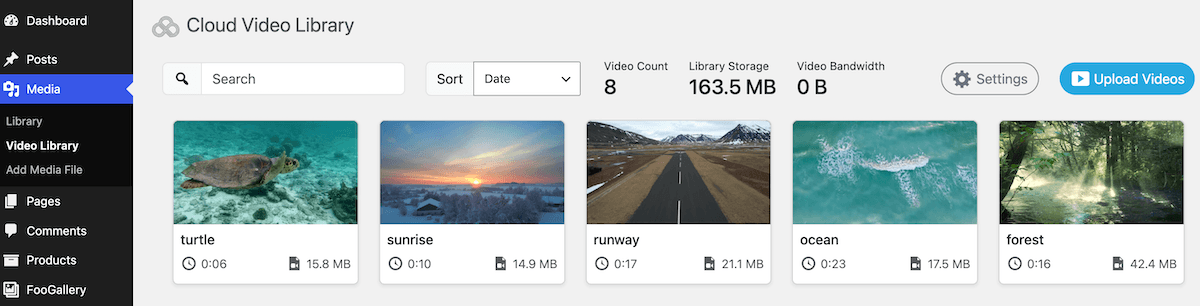
Upload videos into the WordPress media library via Infinite Uploads, which handles the offload quietly in the background. Videos will appear in a dedicated video library within the WordPress Media Library and remain accessible to plugins that read the media library, including FooGallery.
Step 3: Build Your Gallery in FooGallery PRO Expert
In your WordPress dashboard, go to FooGallery > Add Gallery, then:
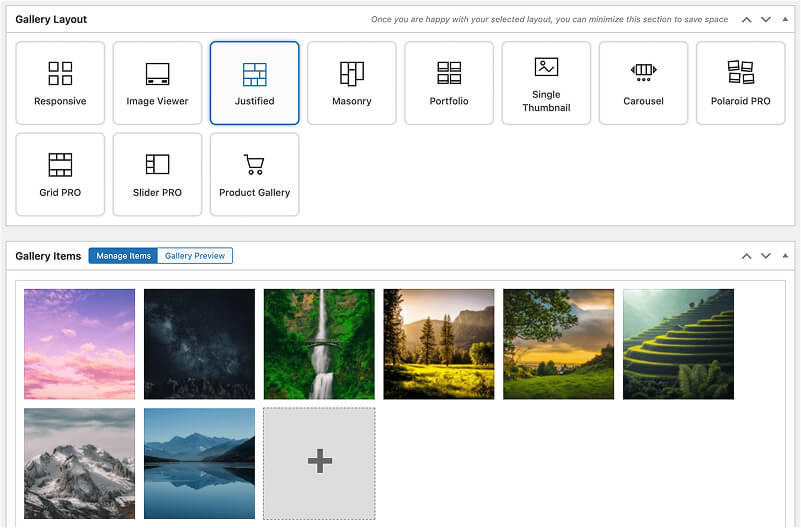
- Give your gallery a name and pick a layout. Masonry, Slider PRO, or Grid PRO all work well for large video collections.
- Click Add From Another Source. This opens a panel showing available datasources. Select the Infinite Uploads datasource.
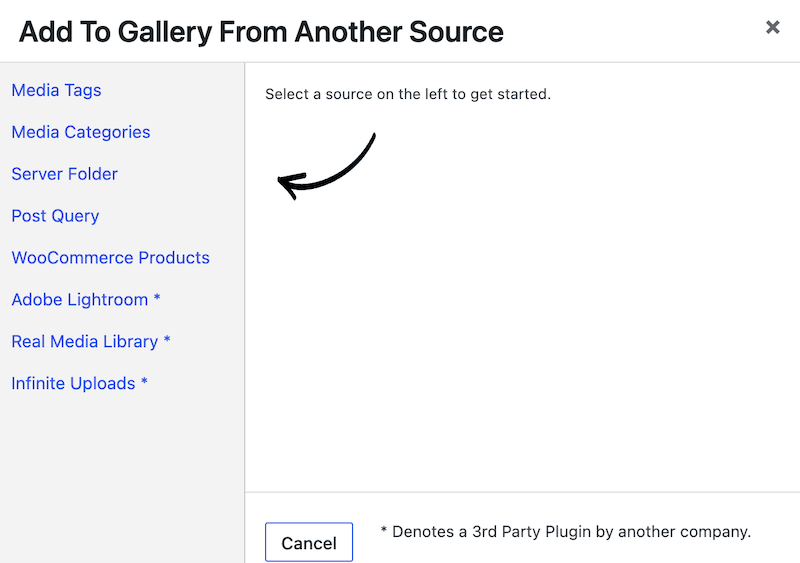
- In the media selection panel, choose Dynamic to pull in every video in the library, or choose a specific selection by searching for particular videos. Click Ok to add them to your gallery.
- Adjust thumbnails, hover effects, and other appearance settings to match your site.
- Make sure the lightbox is enabled so videos play in a clean overlay rather than navigating the visitor away. FooGallery includes certain video and playback settings that you can fine-tune to meet your needs.
- Publish, then embed the gallery on any page or post using the FooGallery block or shortcode.
The result is a polished, responsive video gallery (screenshot below) that loads from your own domain, plays without any third-party interface, and shows visitors exactly what you want them to see (and nothing else).

Configuration Details Worth Getting Right
A few settings are worth double-checking before you publish.
Thumbnails. Galleries using Infinite Uploads will pull in the thumbnails configured in the video library. To change them, click the video and select your preferred thumb or upload a custom image. Good thumbnails do more for gallery click-through than almost any other setting.
Lazy loading. This should be enabled by default, but if you’re building a gallery with many videos it’s worth double-checking. Lazy loading defers thumbnail loading until each one scrolls into view, keeping initial page load times fast.
Lightbox. Make sure it’s enabled so videos play in an overlay instead of navigating the visitor away from the page. The lightbox is also where your brand control actually shows up – this is the moment visitors would otherwise see YouTube’s interface.
Why WordPress Defaults Break With Video
But why would you need this workflow? Let’s explore some of the potential issues with using video hosting platforms to embed videos into your WordPress site.
WordPress itself isn’t actually the problem; your hosting plan is. Most shared hosting environments are designed around small files: images, documents, PHP scripts. A single HD video file can easily run from 500MB to several gigabytes. Upload a dozen of those and you hit storage limits fast. Serve them to real visitors and bandwidth costs spike.
There’s also the upload experience itself. Most hosts cap file upload sizes in PHP, which means anything over 64MB or 128MB gets rejected at the door. Even if you clear that hurdle, large uploads are slow and prone to timeouts.
Cloud offloading removes this constraint. Instead of storing files on your web server, media is sent to cloud storage automatically and served from a content delivery network (CDN). WordPress still manages everything – the media library, galleries, permissions – but the actual files are stored and delivered by infrastructure built for the job. A 2GB video no longer stresses your server because your server never has to store or serve it. The CDN handles delivery, which also means videos load faster for visitors regardless of where they’re watching from.
Infinite Uploads is a WordPress plugin built specifically for this. When you upload a video through the standard WordPress interface, it moves the file to the cloud and serves it from there going forward. From your perspective and your visitors’, nothing changes. From your server’s perspective, the problem goes away.
Why Video Embeds Aren’t the Answer: The Four-Control Problem
YouTube, or similar platforms, is the default advice for video on WordPress, and for hobby blogs or low-stakes publishing it’s a great solution. It solves the storage problem, but often takes something else away. We think of displaying video as a four-control problem (and YouTube, by design, gives you only one of these four factors).
- Control over delivery: where the file actually lives. With a YouTube embed, the file lives on Google’s servers. If the account gets suspended, the policy changes, or the video gets flagged, you lose access to your own content. Self-hosted video via Infinite Uploads keeps the file under your billing relationship with a cloud provider – no policy risk, no flagging.
- Control over presentation: what the player looks and behaves like. A YouTube embed is a YouTube video, full stop. The logo is theirs, the interface is theirs, and after the video ends it serves recommendations, as in the below example, often from your direct competitors. You have limited ability to suppress this on the paid tier and no ability on the free one. FooGallery’s lightbox plays self-hosted videos in your own overlay with no recommendations, no ads, and no trailing UI.

- Control over context: what surrounds the video on the page. When a visitor watches a YouTube embed, YouTube is in the room. Visitors can click through to channel pages, related videos, or search. Self-hosted video in a FooGallery lightbox keeps visitors on your site, in your navigation, looking at your content.
- Control over access: who can see the video. Anything uploaded to YouTube is, by default, publicly searchable. Client videos, internal training content, rough cuts shared for review; all of it can surface in search results. Making videos “unlisted” helps, but it’s not the same as genuinely private. A gallery on your WordPress site can be password-protected, members-only, or gated by whatever access logic you already run.
YouTube gives you one of the four controls: delivery, but not the other three. With Infinite Uploads and FooGallery PRO Expert working together you get all four.
How the Options Compare
| YouTube embed | Vimeo embed | Self-hosted + FooGallery | |
| Playback control | None – YouTube UI, recommendations, ads (free tier) | Limited – some branding removal on paid tiers | Full – your lightbox, your styling, nothing else |
| Privacy | Public by default; unlisted is not private | Better; paid tiers support real privacy | Full – password, membership, or role-based access |
| Brand presence | YouTube branding visible | Vimeo branding reduced on higher plans | Your brand only |
| Platform risk | High – flagging, policy changes, suspensions | Moderate – less aggressive moderation | None – files are under your cloud account |
| SEO and on-site engagement | Visitors can click through to YouTube | Visitors stay on-page more reliably | Visitors stay on your domain throughout |
Who is this Setup Actually For?
This combination is useful for anyone hosting video in WordPress, but it earns its keep in four more specific situations.
- Videographers and photographers delivering client work. Instead of sending clients a Dropbox link or a YouTube URL, give them a dedicated gallery page on your own site; password-protected if needed, branded to your studio, with no third-party distractions. The work looks better, the experience feels more professional, and the files stay under your control.
- Agencies and freelancers building portfolios. A portfolio embedded from YouTube can hand visitors off to YouTube after every video. Self-hosted video keeps people on your site, in your environment, looking at your work, with no recommendations for competing studios and no ads.
- Course creators and educators. If you’re running a membership site or selling online courses, hosting content on YouTube creates a real dependency. Students can find your videos without paying, and your course structure breaks if a video gets flagged. A self-hosted library keeps the course yours.
- Internal company video libraries. Training content, onboarding videos, and product demos for internal teams do not belong on a public video platform. A self-hosted gallery on your company site keeps sensitive material off the open web and accessible only to the people who need it.
Host Your Videos with FooGallery & Infinite Uploads
YouTube and Vimeo solve a real problem: they make video hosting easy when WordPress’s defaults make it hard. But there is a downside to using these platforms: it compromises your control over how your content is presented, who can find it, and what happens after someone watches it.
Cloud offloading removes the constraint that pushed you toward those platforms in the first place. With Infinite Uploads handling storage and delivery, and FooGallery PRO Expert handling display, there’s no longer a practical reason to hand your video content over to a platform that doesn’t share your interests.
Your videos, your site, your rules. Get started with Infinite Uploads and FooGallery today.
FooGallery WordPress gallery plugin
The Best WordPress Gallery Plugin
FooGallery is an easy-to-use WordPress gallery plugin with stunning gallery layouts and a focus on speed and SEO.
Self-Hosted Videos: Frequently Asked Questions
Yes, but we recommend offloading the files to cloud storage, rather than uploading them directly to WordPress. Shared hosting is not built for video delivery: uploads are capped (typically at 64–128MB), storage fills quickly, and bandwidth costs rise. Infinite Uploads solves this by sending media to S3-backed cloud storage and serving it via a CDN.
FooGallery PRO Expert reads the WordPress media library and pulls in videos directly, including videos offloaded via Infinite Uploads. Choose a Masonry, Grid PRO, or Slider PRO layout, enable the lightbox, and videos play in a clean overlay on your own domain.
Not if delivery goes through a CDN. Infinite Uploads serves media from a CDN by default, which is typically faster than self-hosting on shared infrastructure and comparable to YouTube playback, but without the tracking and recommendation overhead.
For most client-delivery workflows, yes. Vimeo is friendlier than YouTube on branding and privacy, but videos still live on Vimeo’s servers under their terms. A self-hosted gallery keeps files under your own cloud account and gives clients a branded experience on your domain.
No. Both Infinite Uploads and FooGallery PRO Expert install like any other WordPress plugin. The integration between them works out of the box; there’s no code, no custom configuration, and no separate video-hosting account to manage.