
Many website owners will be familiar with the struggle of finding the ideal gallery solution. You may have spent hours of your time wrestling with different gallery plugins to find the best solution for your needs. They look great in the demo, you install them, then your site slows to a crawl or the galleries break on mobile devices.
As a gallery plugin developer, we see multiple instances of clients looking for a fix for their gallery issues. This can range from photography portfolios taking over 8 seconds to load, to product galleries that don’t display correctly on mobile devices, or even gallery plugins that suddenly stop working after a WordPress update.
This happens more often than you’d think in the WordPress ecosystem. Fortunately, there are several reputable gallery plugins available. Among the top choices is FooGallery, a fast, responsive plugin designed to simplify gallery management while delivering professional results.
What Actually Matters in a Gallery Plugin
When choosing a WordPress gallery plugin, here are the essentials to consider:
- Fast Loading Speed: Page speed is crucial for both SEO and user experience. Google rewards faster websites, and visitors are more likely to stay engaged if your galleries load instantly. Many gallery plugins load full-size images unnecessarily, leading to sluggish performance.
- Mobile Responsiveness: With more than half of web traffic coming from mobile devices, a gallery must adapt seamlessly to smaller screens. Unfortunately, some plugins only optimize for desktop, leaving users frustrated on mobile.
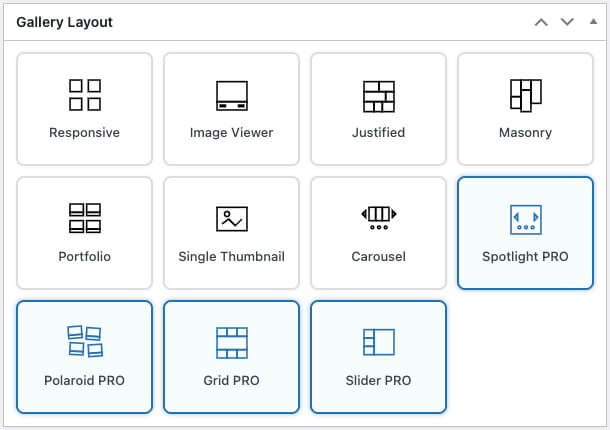
- Layout Flexibility: Professional websites often require more than a basic grid. The best plugins offer options like Masonry, Justified, and Sliders while avoiding overwhelming users with unnecessary complexity.
- Compatibility and Reliability: A gallery plugin should integrate smoothly with your theme, other plugins, and WordPress updates without frequent breakage. Stability is often overlooked but critical for long-term use.
The Competition Landscape
There are several popular gallery plugins in the WordPress space, each with strengths and drawbacks:
- FooGallery: This popular gallery plugin offers an assortment of layouts and customizations, with intuitive settings making it easy to use. It comes with built-in optimizations such as lazy loading and responsive display.
- Envira Gallery: Known for its user-friendly drag-and-drop builder and good mobile handling. The free version is limited, though, and essential features often require a premium upgrade.
- Modula Gallery: A modern plugin with stylish layouts and customization options. While it looks great, it doesn’t have the same long-term track record of stability as FooGallery or NextGEN.
- NextGEN Gallery: One of the oldest gallery plugins, offering powerful gallery management features. However, its interface can feel outdated, and it often adds bulk that slows down websites.
- Jetpack’s Gallery Module: Convenient for users already running Jetpack, but limited in customization and features compared to dedicated gallery plugins.
So which one should you choose?
Quick Answer: Top 3 WordPress Gallery Plugins
Here’s the fast takeaway for 2026:
- FooGallery → Best overall for speed, design flexibility, and reliability.
- EnviraGallery → Good for photographers, but limited free version.
- Modula Gallery → A simple, flexible, and performance-focused solution for WordPress
Comparison Table: Top Gallery Plugins
| Plugin | Best For | Avg. Load Speed* | Mobile Responsiveness | Free Version Usability | Avg. User Rating |
|---|---|---|---|---|---|
| FooGallery | Best overall (businesses, portfolios, ecommerce) | ~1.2s | Excellent | Extensive features included | ⭐ 4.8/5 |
| EnviraGallery | Photography portfolios | ~1.6s | Good | Limited, requires upgrade | ⭐ 4.7/5 |
| Modula Gallery | Bloggers or Portfolios; Custom-layout | ~1.5s | Excellent | Good base features | ⭐ 4.7/5 |
*Performance benchmarks based on user tests with 50 optimized images on average hosting conditions. Real-world numbers will vary significantly based on your host, theme, caching configuration, and image sizes.
Complete Gallery Plugin Analysis
FooGallery – Best Overall WordPress Gallery Plugin

FooGallery stands out as the best free WordPress gallery plugin in 2026, with performance and usability that surpass many premium-only options.
- Key Features: Masonry, Justified, and Grid layouts, among others; lazy loading; responsive breakpoints; customizable hover effects; lightbox integration; video support in FooGallery PRO Expert; WooCommerce integration in FooGallery PRO Commerce.
- Performance Benchmarks: Independent tests show FooGallery loads in ~1.2s with lazy loading enabled, outperforming competitors in Core Web Vitals.
- Mobile Optimization: Touch gestures and responsive breakpoints deliver a natural browsing experience on smartphones and tablets.
- Pricing: The Free version includes robust features. The most popular plan, PRO Expert, starts at $69.99 a year, unlocking filtering, video galleries, and advanced styling.
- User Feedback: “FooGallery cut my portfolio load time in half. Clients can browse smoothly on mobile, and updates never break my site.”
The Best WordPress Gallery Plugin
FooGallery is an easy-to-use WordPress gallery plugin, with stunning gallery layouts and a focus on speed and SEO.
EnviraGallery – Photography-Focused Alternative

EnviraGallery has long been a favorite among photographers thanks to its drag-and-drop builder and image protection features.
- Strengths: User-friendly interface, watermarking, album creation (available in the Pro plans), and many more features.
- Limitations: Free version is restricted. Core features such as slideshows, albums, and social sharing require premium plans starting at $69.50/year.
- Comparison with FooGallery: EnviraGallery and FooGallery offer many similar features, but FooGallery generally has better free functionality and layouts.
Modula Image Gallery – Beginner Friendly

Modula is a user-friendly WordPress gallery plugin focused on fast, responsive galleries with a visual drag-and-drop builder and flexible layout options. It’s great for users who want creative control without coding.
- Strengths: Strong including drag-and-drop sizing and a visual gallery builder, intuitive for beginners, responsive galleries and decent performance .
- Limitations: Most advanced features require the premium version, fewer pre-built gallery templates than some competitors, which can mean more manual setup.
- Comparison with FooGallery: Modula tends to offer more creative layout control (especially custom grids) and a more designer-friendly interface, while FooGallery includes more built-in layout templates and robust free features out of the box.
FooGallery strikes the right balance:
- A free version with robust functionality.
- Reasonable premium pricing for advanced features like filtering and video support.
- Active development that ensures compatibility with WordPress updates.
Why Customers Keep Coming Back to FooGallery
FooGallery stands out by addressing these pain points directly:
- Performance and Speed: Lazy loading ensures images only load when visible, keeping pages lightweight.
- Mobile Experience: Touch gestures feel natural, and responsive breakpoints are intelligently designed.
- Multiple Layouts: Masonry, Justified, and Grid options work well for photography portfolios, business websites, and ecommerce galleries.
- Customization: Adjust colors, spacing, and hover effects easily, or extend functionality with custom CSS.
- Reliability: Regular updates follow WordPress standards without breaking existing galleries.
One photography client, for example, used FooGallery’s free version to create a fast-loading portfolio with the Masonry layout. The site remained responsive, professional, and easy to manage — without slowing down or requiring expensive upgrades.

Practical Setup Tips
To maximize performance with any gallery plugin, keep these best practices in mind:
- Resize images before uploading: Aim for around 1200px wide for most galleries.
- Choose layouts strategically: Masonry works best for mixed dimensions; Grid for uniform images; Justified for polished, professional rows. FooGallery offers over 10 layouts so you can choose the ideal option for your needs.
- Test on real mobile devices: Browser tools can’t always replicate the touch experience.
- Enable lazy loading: Especially useful for pages with multiple galleries (this is enabled by default in FooGallery).
- Use effects sparingly: Overusing animations can harm performance and user experience.
Why This Plugin Works for Different Users
- Photographers: Clean, professional layouts with lightbox support (as in the screenshot below) showcase portfolios effectively.

- Small Business Owners: FooGallery offers an easy-to-use interface, professional-looking galleries, and reliable performance without needing a developer.
- Developers: Clean code, hooks, and filters make FooGallery customizable without editing core files.
- Ecommerce Sites: WooCommerce integration and fast-loading product galleries optimized for mobile shoppers.
The FooPlugins team actively maintains FooGallery, providing documentation and support to keep your galleries running smoothly.
What You Should Expect
FooGallery won’t magically transform your website, but it will deliver reliable gallery functionality without unnecessary complexity. You can expect:
- Faster Load Times: Optimized performance with lazy loading.
- Responsive Design: Mobile-friendly galleries with intuitive navigation.
- Professional Layouts: Multiple layout options that look polished.
- Stable Updates: Regular improvements without breaking your site.
- Scalability: A solid free version plus premium features like video galleries, filtering, and advanced customization.
In short, FooGallery saves time, improves user experience, and reduces troubleshooting headaches, making it one of the best WordPress gallery plugins for photographers, businesses, and developers alike.
Ready to Simplify Your Galleries?
Start with the free version of FooGallery, or explore the premium features for advanced customization. Either way, you’ll get a fast, responsive, and reliable WordPress gallery plugin designed to grow with your website. Get started with FooGallery now.
The Best WordPress Gallery Plugin
FooGallery is an easy-to-use WordPress gallery plugin, with stunning gallery layouts and a focus on speed and SEO.
