
Social: Sharing

The Sharing setting in FooGallery Social allows you to make images and videos shareable from FooGallery lightbox. Note that this feature only works with the built-in lightbox for FooGallery.

Social sharing in FooGallery

You can enable Sharing in the general settings under the Social tab in your gallery. Then navigate to the Sharing tab, where you can adjust more specific settings.
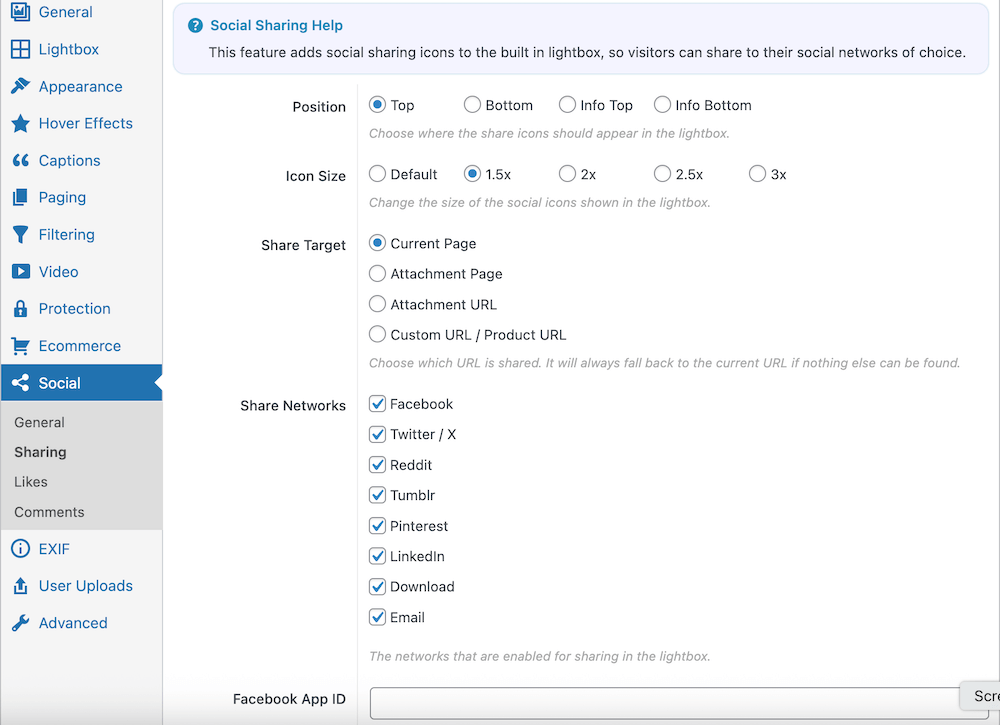
Social sharing settings in FooGallery

Here you can choose the position and size of the social icons, along with the share target. There are also several networks, each of which can be enabled or disabled for sharing. You can also include Download and Email, giving users the ability to download the item directly, or share via email.

Resources

Find the right next step

Use this grid for documentation indexes, support routes, account links, affiliate resources, and download pages.

Documentation

Search setup guides, product docs, and troubleshooting articles.

Support

Open a ticket with product details so we can help quickly.

Licensing

Review account, renewal, refund, and license information.

Pricing update

Monthly & Lifetime plans are currently not unavailable

We’re not offering these payment options right now. Leave your name and email and we’ll let you know as soon as they return.

NameEmailNotify Me

No spam - Unsubscribe anytime