
There is a significant traffic gap that nobody talks about: 43.4%+ of all sites run WordPress, yet most record far fewer good conversions. Enterprise CRO tools would be a good solution, but these are generally unaffordable for the typical site owner.
Your average ecommerce conversion rates still hover between 2% and 4% across sectors, which could be greatly improved with the right CRO tools. But as most WordPress site owners are already aware, finding affordable optimization tools can be a challenge.
A/B testing is a useful method for establishing where optimization can help, but it sits on a spectrum: widget-level experiments (such as pop-ups or bars) offer directional lift long before full-page tests achieve statistical significance. After Google Optimize’s sunset, many small sites lost their free A/B‑testing option.
FooConvert gives you a reasonable solution for WordPress sites. It is a Gutenberg-native WordPress plugin that lets you duplicate, trigger, and measure bars, pop-ups, and fly-outs, without code or external dashboards. While stat-perfect tests are ideal, they are also optional, and even without perfect significance, popup-level data can justify real business decisions for low-traffic WordPress/WooCommerce sites.
This guide provides a quick-start plan, a three-step workflow, and a migration toolkit, with FooConvert seamlessly integrated throughout, from setup to rollout.
What is A/B Testing for Landing Pages?
A/B testing consists of creating two versions of a page (or marketing element on a page) and testing both to see which performs better. Using a split audience to test various on-page elements, such as forms, popups, or even the page itself, allows you to gather data on which works better for your audience. This further allows you to make data-driven decisions about your content.
You can think of A/B testing as insurance against making costly mistakes. Instead of redesigning based on hunches, you validate changes with real visitor behavior before committing resources. This eliminates much of the guesswork and can help to improve your conversion rates.
The mechanics of this are fairly straightforward. You simply need to duplicate your page, change one element, split your traffic between the versions, and measure which converts better. But let’s look at this in a bit more detail.
Lean A/B Testing Workflow
Whether you are a frugal experimenter, a crisis responder, or a methodical planner, there are three clear stages to keep you on the right path when it comes to A/B testing. Each section below delivers concrete actions that you can tick off, without needing developer support.
Plan & Prioritize
To begin with, choose one money metric (this could be sales, demo bookings, opt‑ins, or similar). Based on this, you can plan and prioritize which element you want to test.
- Use the ICE framework (Impact–Confidence–Ease) to stack A/B test ideas by scoring them 1–10 across those three factors, then averaging the scores. With under 500 monthly conversions, you should focus on high-impact, easy-to-run tests (like headlines and CTAs) since they affect all visitors and require minimal effort. Larger redesigns score lower because they’re harder to implement and unlikely to reach statistical significance with low traffic.
- Moving beyond basic implementations, you can start to test triggers that drive action. This could include social proof elements (like testimonials, review counts, “X people viewing”), which can lift conversions, or trust signals (security badges, guarantees, certifications), which are critical for first-time visitors.
FooConvert continues to work very well. I’ve tried several different version of flyouts, and yours really does exactly what I’m looking for. Non-intrusive, concise, updates MailPoet, and it looks great on mobile.
Trog
- Next, draft hypotheses that include speed. For example, “If the popup loads in under 1s, conversions will rise by 10%”.
- It’s important to match the test type to the amount of traffic. Sites with less than 300 visits per month can perform widget tests, while those with 300–1000 would find manual page split tests more effective. Sites with over 1000 monthly visits can use a full split‑URL test.
- You should also log goals and baselines in a shared document to satisfy all stakeholders. It is also useful to stipulate stop-loss rules at this point – this sets an acceptable margin of performance for your conversions, and anything below this results in ending the test early. The average CVR (2‑4%) is a good benchmark to work against, to put potential gains in context.
Execute & Track
The next step is to put your plan into action and monitor the results. Having clear data ensures that you can make accurate adjustments to your conversion-focused elements in the next stage.
- Clone the control widget or page and tweak only one element. You can try changing the tone or wording in your headings or CTAs, button size or colors, navigation, checkout process, and so on. The key is to make only one meaningful change at a time.
- When using triggers, do so wisely: exit-intent could be used for cart abandoners, while 30% scroll depth is better suited to blog CTAs. FooConvert covers both of these (and more) out of the box, allowing you to target different user groups at optimal times.

- Monitor Core Web Vitals live with PageSpeed or your host’s dashboard. Hit pause on your campaign if LCP (Largest Contentful Paint) drifts above 2.5s. If this happens, redesign the element on which you’re working and redeploy.
- Run tests for at least one weekday‑weekend cycle (approximately 14 days) to capture behavioural variance. You should also ensure that there are 100 or more measurable events per variant before doing the final analysis. This will give you a statistical significance indicating which version performs better for your audience.
- Log anomalies (such as email blasts or theme updates) so they can be excluded later.
Analyze & Communicate
In this final step, you’ll analyze the data you received after implementing your changes. This will be used for each consecutive iteration, allowing for progressively better conversions over time.
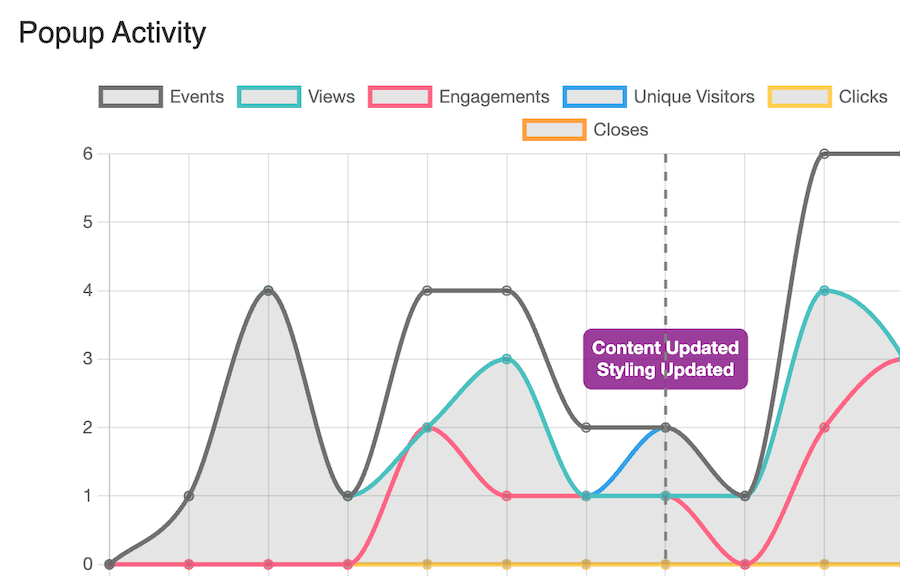
- It’s good to remember that even rough math (like tool stats or a quick chi-square test) is better than relying on just a gut feeling. Statistical significance isn’t all-or-nothing – it’s a spectrum of confidence you can use to make smarter decisions, especially with low sample sizes. FooConvert’s popup stats, for example, can give you a good understanding of how individual popup elements are performing.
- Once volume allows for it, segment your testing by channel. Google Ads may behave differently (and therefore give different results) than organic traffic.
- Archive screenshots and/or test summaries in a “CRO library” to prevent redoing inactive hypotheses. Once a change has been deemed unsuccessful by comparison to its counterpart, you don’t want to implement this change again by mistake.
- Finally, return to the ICE-prioritized backlog to continue your systematic conversion optimization.
Lean A/B Testing with FooConvert and Performance Guardrails
FooConvert PRO offers an affordable and simple way to test conversion-focused elements on your site with it’s A/B Testing Experiments. This allows you to set up any popup within FooConvert and create variants of it, in order to determine the winning option for your audience.
Here’s how it works:
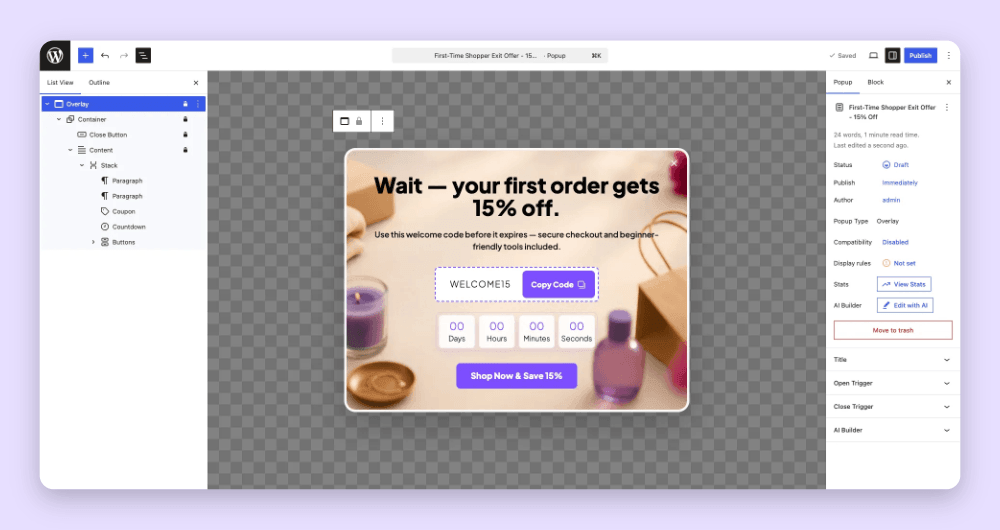
- Create any popup using FooConvert. Go to the A/B testing tab and click on Create New Experiment. Give it a name and select the popup you have created for this test as the control. Set your parameters, such as the goal, end date, minimum views and auto-winner threshold. Now click on Create Experiment.
- Below your experiemnt settings, you will see the participants. This will include the control popup which you created, and any variants that you create using the control. You can change any elements in the popup and save these as different options.
Here’s an example of the same countdown popup, but with different colors and slightly different designs.


- You can also experiment with visibility triggers, behavior and so on. Set exit-intent, scroll-depth, time-on-page, or anchor-click triggers for your popups so visitors actually see the experimental content when it matters most.
- Once the experiment has run for a statistically significant time (usually at least 7-10 days), you can assess the results and determine which variant has been the most successful. Alternatively, FooConvert’s A/B Testing allows you to enable an auto-winner, which will automatically apply the winning variant after the set threshold has been met.
Testing Pitfalls that Kill Conversions
The aim of testing is to find solutions that improve your conversions. However, there are several stumbling blocks that you need to look out for.
Poor record-keeping creates testing amnesia, causing you to implement and retest changes that have already failed. Not only does this waste time, but it’s likely to have a negative impact on your conversions. As such, it’s advisable to document every test in a shared spreadsheet with hypothesis, duration, results, and screenshots.
Ignoring mobile performance can create additional problems. With 61.85% of global web traffic from mobile, desktop-only tests miss half your audience.
Testing during anomalies (such as sales, holidays, site outages, and so on) will pollute your data, giving unreasonably high or low results. Mark these periods in your records and extend the test duration accordingly to prevent skewed data.
Brains Over Budget: Your CRO Launchpad
Enterprise myths die hard; results don’t. While traditional A/B testing is often recommended, it can be costly for smaller websites. In this scenario, small-sample, widget-level tests can still make a significant difference to conversions, and consequently, to your profit.
Using the three-step workflow outlined in this article, marketers can plan, execute, and analyze testing opportunities that can deliver results in under 30 days. In a month, you can have measurable progress and increased conversions.
But there are considerations that you need to bear in mind. Speed is your silent A/B test variable; it may not reflect in your results, but it will have an impact, so ensure you are using lightweight tools that offer the same results. To that end, bloated scripts can erase gain,s but a tool like FooConvert stays lean and is Gutenberg-native.
Migration from Google Optimize is painless – deploy FooConvert, import audiences via UTMs, and keep rankings intact.
Install FooConvert now, and have a win by month-end.
FooConvert WordPress conversion plugin
The Best WordPress Conversion Plugin
FooConvert is an easy-to-use WordPress conversions plugin, draw attention, increase sales and engagement.