

FooBox Responsive Lightbox for WordPress
FooBox is the official WordPress lightbox plugin by FooPlugins for responsive image, gallery, video, HTML, and iFrame overlays. Start with simple image lightboxes, then use FooBox PRO when you need advanced media, sharing, slideshow, WooCommerce, and Block Editor controls.

100,000+ WordPress sites
Images videos and HTML
Auto Link existing images
30 day guarantee
Responsive media lightbox
Give visitors a closer look without sending them away from the page.
FooBox opens images, galleries, videos, forms, iFrames, and HTML content in a mobile-friendly overlay. It works out of the box for simple image lightboxes, while FooBox PRO adds advanced media, sharing, slideshow, WooCommerce, and tracking features.
For galleries
Use FooBox with WordPress galleries, FooGallery, NextGEN Gallery, Envira Gallery, and other gallery plugins.
For rich media
Open YouTube Shorts, YouTube embeds, Vimeo, Wistia, Dailymotion, direct MP4/WebM/WMV/OGV files, HTML, forms, and iFrames in FooBox PRO.
For commerce
FooBox PRO supports WooCommerce product images and Fotomoto buy buttons inside the lightbox.






Why Us
Why choose FooBox for WordPress lightboxes
FooBox is built for simple WordPress image lightboxes first, with optional PRO controls for galleries, video, HTML, WooCommerce, sharing, slideshow, and asset loading.
Mobile Ready
FooBox is a responsive WordPress lightbox, automatically resizing to fit the visitor’s screen.
Social Sharing
FooBox PRO includes social sharing, deeplinking, email sharing, and image download links.
Video Lightboxes
Open YouTube Shorts, YouTube embeds, Vimeo showcases, Wistia, Dailymotion, and self-hosted video files with FooBox PRO.
Auto Link Existing Images
FooBox works out of the box, with Auto Link Existing Images and optional settings when you want to customize behavior or styling.
Built for the Block Editor
Configure Image, Gallery, and image-target Button blocks directly in the editor. FooBox PRO also opens hidden Group content, video, iFrames, shortcodes, and FooGallery.
Built-in Slideshow
FooBox PRO can display gallery items as a slideshow, including autoplay.
FooBox Features
A Complete Lightbox for Your Content
Display, share, and manage images, videos, and other visual content in a responsive overlay.

Responsive Lightbox – Mobile Ready
FooBox adds responsive lightbox capability to your site, resizing images, videos, HTML elements, and other visual data across screen sizes.
- Forward and backward navigation for gallery content
- Touch-friendly viewing on mobile and tablet devices
- Built-in slideshow with progress bar in FooBox PRO

Performance and Asset Loading Controls
Fine-tune how FooBox loads on your site with per-post include and exclude asset controls, an exclude assets by default mode, scripts-in-footer loading, and options to disable or deregister other lightboxes when FooBox should handle the experience.
- Include or exclude FooBox assets per post
- Use exclude assets by default for tighter loading control
- Improve plugin compatibility by disabling competing lightboxes

Social Sharing Built In
FooBox PRO includes social sharing icons, deeplinking, email sharing, and original image download options so every media item can have its own URL and sharing path.
- Control icon placement, stacking, and hover behavior
- Toggle Reddit and Tumblr sharing and configure Facebook App ID support
- Use X Card validation, X image sizing, and Bitly URL shortening

Multiple Gallery & Plugin Support
FooBox was built for WordPress and supports WordPress attachment images, WordPress galleries, FooGallery, NextGEN Gallery, Envira Gallery, and more.
- Works with standard WordPress gallery content
- Integrates with popular gallery plugins
- FooBox PRO supports Gravity Forms and WooCommerce use cases
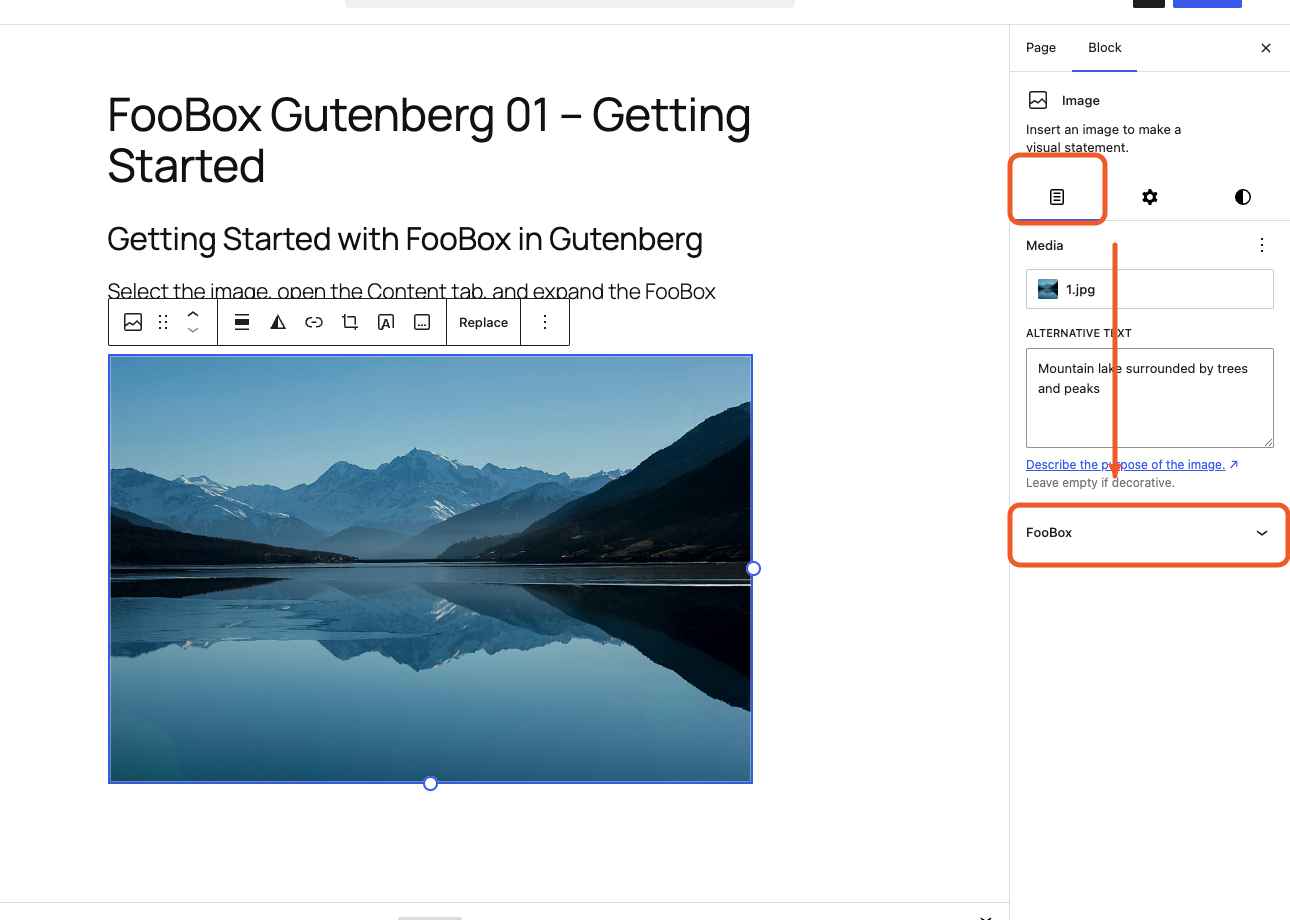
Block Editor Controls and Legacy Content
Use dedicated FooBox controls on supported blocks for new content, or let Auto Link Existing Images upgrade older image-heavy posts without editing every page. FooBox can also take over WordPress’s core “Expand on click” intent for a consistent frontend lightbox.
- Configure Image, Gallery, Button, and Group blocks in the editor
- Use WordPress “Expand on click” with FooBox compatibility
- Auto-link older unlinked attachment images when needed

Video Lightboxes
Open YouTube Shorts, YouTube embeds, Vimeo showcases, Wistia, Dailymotion, and direct MP4/WebM/WMV/OGV files from a text link or image thumbnail. FooBox PRO also supports captions over video.
- Display hosted videos and direct video files without cluttering a gallery
- Use thumbnails or text links as the trigger for YouTube, Vimeo, Wistia, Dailymotion, and self-hosted files
- Add captions to video lightboxes on any device
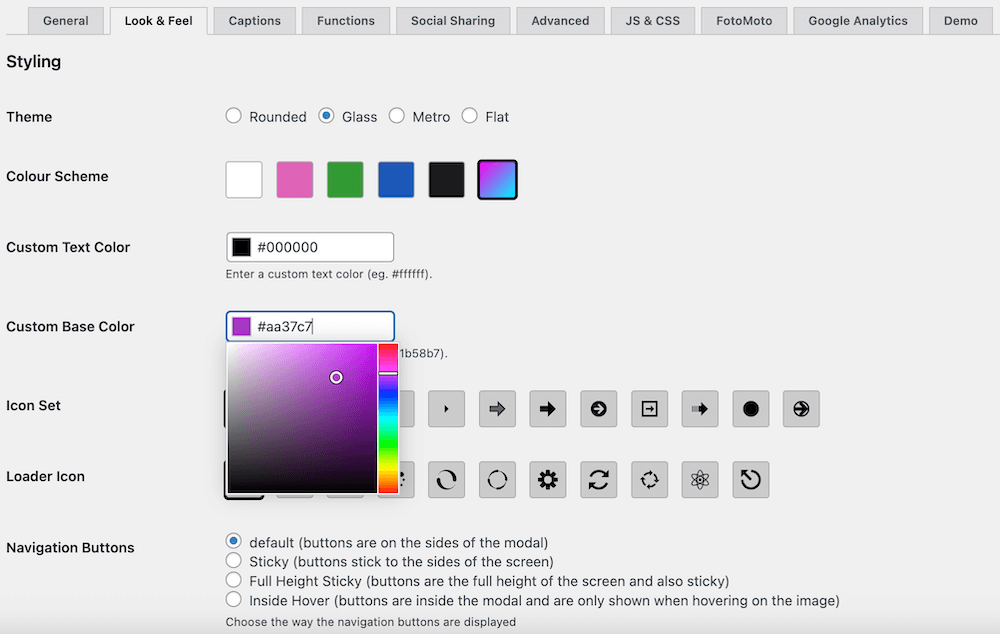
Design, Captions, and Large Image Viewing
FooBox PRO has 4 different lightbox themes, color schemes, custom colors, icon sets, loader icons, navigation button styles, and 12 open/close animations so the lightbox can match the site around it.
- Captions for images, videos, HTML, and iframes
- Hover-only captions, initially hidden captions, sticky bottom captions, caption animations, configurable title sources and description sources, and caption cleanup
- Large-image panning with an optional overview/minimap for oversized images

Fotomoto Integration
FooBox works with Fotomoto so visitors can purchase digital photos from inside the lightbox without navigating through multiple links.
- Buy buttons and cart options inside the lightbox
- A simple ecommerce path for digital photos
- Useful for photographers and visual product sites
What Our Clients Say
Trusted by Thousands of Websites
-
FooBox Pro brings lightbox functionality to your images with class. Their modal options are beautiful. I have complex image needs, and the overrides and its ability to play nice with other lightbox solutions is wonderful. FooBox Pro should be a given for any site that is image heavy, such as blogs, tutorial and docs sites, product sites, and more.

Ronald Huereca
-
Its easy to get going right after the install! Not too complex as I am needing it for “single” images to lightbox! Really excellent!
Thomas Holst
-
In addition to being an attractive and user friendly lightbox, FooBox Image Lightbox allowed me to provide a convenient image download link for visitors to my genealogy website!

Rob Mahan
-
FooBox customer service is very responsive and thorough in the help they provide. They also have great enthusiasm and their plugin will make your images look terrific!

Patricia Burroughs-Bishop
-
FooBox completely transformed the way our images are displayed. The responsive design is flawless, and the social sharing options are a huge plus. Our visitors love the sleek look—and so do we!

Wahaj Ali








FooBox PRO – 1 Site
$39.99 / year
Ideal for creating responsive media lightboxes.
Choose 1 SiteMost Popular
FooBox PRO – 5 Sites
$89.99 / year
Ideal for responsive media lightboxes across your portfolio.
Choose 5 SitesFooBox PRO – 25 Sites
$199.99 / year
Ideal for responsive media lightboxes for your agency.
Choose 25 SitesEvery plan includes
- Social sharing
- Video and HTML lightboxes
- Deeplinking
- Lightbox Themes & Customization
- WooCommerce support
- Slideshow controls
- Large Image Panning Support
- Priority support and updates
FAQs
Get the Answers You Need
Common questions about FooBox, WordPress lightboxes, and when to choose FooBox PRO.
A WordPress gallery lightbox displays images in a modal overlay above the page, allowing visitors to view larger images and navigate through a gallery without leaving the page.
FooBox is a WordPress lightbox plugin that adds customizable, responsive overlays for images, galleries, videos, and HTML content, so visitors can focus on media without leaving the page.
Yes. FooBox integrates with WordPress native galleries and plugin-based galleries, adding navigation, animations, mobile gestures, and optional social sharing.
No. FooBox works out of the box once activated. Configuration is optional and only needed when you want to customize appearance or behavior.
FooBox requires WordPress 5.0 or higher for full compatibility with modern gallery blocks.
Yes. FooBox PRO enhances WooCommerce product images with lightbox overlays, full-screen viewing, and mobile navigation.
FooBox Free opens visual data in a responsive lightbox and displays image captions. FooBox PRO adds 4 different themes, advanced color and icon controls, video and HTML lightboxes, social sharing, deeplinking, slideshow controls, WooCommerce support, advanced captions, asset loading controls, large-image panning, and more.
Yes. Auto Link Existing Images can wrap older unlinked attachment images so they open in FooBox, which helps migrate legacy image-heavy content without manually editing every post.
FooBox PRO supports YouTube Shorts, YouTube embeds, Vimeo showcases, Wistia, Dailymotion, and direct MP4/WebM/WMV/OGV files, along with captions for video lightboxes.
FooBox adds controls directly to supported Image, Gallery, Button, and Group blocks. FooBox Free supports Image and Gallery lightboxes plus image-target Button blocks. FooBox PRO adds hidden block content, video, iFrame, shortcode, and FooGallery lightboxes. Start with the Block Editor guide.
Ready to decide?
Choose the FooBox plan
that fits your lightbox goals
Use the pricing section to choose the right license, or start the free trial to test FooBox PRO before buying.